Finite Scheduling
Build realistic schedules that account for real capacity, setup, run, teardown, move time, work centers, and due dates, replacing spreadsheet guesswork with a browser-based planning workspace.

Planify helps manufacturers connect demand, work orders, capacity, shifts, setups, and dependencies in one browser-based planning workspace. Instead of relying on fragile spreadsheets or infinite-capacity ERP schedules, teams can build realistic finite schedules, test disruptions, and make confident customer commitments with software designed for the complexity of real shop floors.
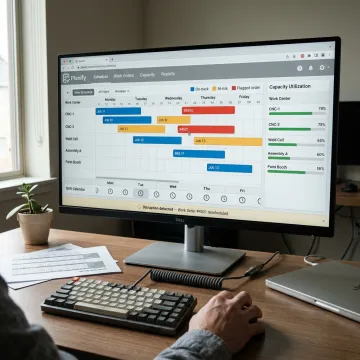
Planify combines finite scheduling, what-if replanning, shift calendars, dependencies, and ERP connectivity for manufacturers.
Build realistic schedules that account for real capacity, setup, run, teardown, move time, work centers, and due dates, replacing spreadsheet guesswork with a browser-based planning workspace.
Model rush orders, machine breakdowns, and changing priorities before committing. Planify shows downstream impact so planners can choose the least disruptive response quickly.
Schedule work inside real production calendars, including first, second, and third shifts, overtime rules, workforce availability, weekend closures, holidays, and exceptions.
Reduce hidden capacity loss by modeling sequence-dependent setup times, grouping compatible jobs, and sequencing around changeover windows instead of ignoring them.
Keep complex routings accurate with operation sequences, parent-child work order links, predecessor locks, and dependency rules that remain intact after replanning.
Connect work orders, routings, and work-center data from ERP systems while keeping Planify as the dedicated scheduling layer your planners can use daily.
Planify gives manufacturers a practical bridge between demand planning and production execution. Planners can schedule against real capacity, account for setup and changeover time, enforce routing dependencies, and replan around disruptions without rebuilding everything manually. The result is a schedule your team can trust, because it reflects how your floor actually runs.

OnePlanify helps manufacturers turn complex production realities into schedules they can trust.
Planify makes comprehensive finite scheduling approachable with a spreadsheet-familiar planning workspace.
Schedules respect setups, shifts, dependencies, capacity, overtime rules, and disruption realities.
Pretend mode lets planners test rush orders or breakdowns before committing changes.
Small-batch onboarding helps teams connect ERP data and run schedules faster.
Experienced scheduling guidance for complex manufacturing teams.

Scheduling Specialist
Dave has dedicated his career to assisting manufacturing companies in improving performance through strategic software solutions. He has had direct experience with many of the leading ERP and CAD/CAM providers.
Demand planning software helps businesses forecast, plan, and coordinate future demand so operations can respond with the right capacity, materials, and timing. For manufacturers, the most useful systems connect demand signals to production realities such as work orders, routings, setups, shifts, machine capacity, dependencies, and disruption scenarios. Planify focuses on turning that planning into executable, finite shop-floor schedules.
Get clear answers about your schedule, ERP, and implementation path.

Built around real setups, shifts, dependencies, and disruption.
Browser-based SaaS with no on-prem installation required.
Supports work order, routing, and work-center data connections.
Request a meeting to see Planify run on your real work orders, routings, shifts, and constraints.
To help us assist you faster, please include the reason for your message so the relevant team can reach out as soon as possible.
To help us assist you faster, please include the reason for your message so the relevant team can reach out as soon as possible.