Introduction
Walk onto any shop floor on a Tuesday morning, and you'll find a dozen jobs running at once. Different machines, different shifts, different materials, all moving toward different deadlines. The document holding that chaos together is the work order.
When work order management breaks down, the damage shows up fast: operators guessing at instructions, materials pulled for the wrong job, deadlines slipping because nobody flagged a machine conflict. Add a breakdown, a shift change, or a rush order, and a "solid" schedule can fall apart within hours.
Manufacturing's scheduling problem isn't new. NIST's survey of job-shop scheduling techniques describes it as a genuinely difficult dynamic problem, one where "reactive scheduling" (revising a plan the shop floor has already overtaken) is a constant, everyday reality.
This guide covers what a manufacturing work order actually is, the components that make one effective, and the common types you'll encounter. It also walks through the full management lifecycle and the challenges (including scheduling) that determine whether your production stays on track.
Key Takeaways
- A work order turns high-level planning into a specific, trackable shop-floor task
- Missing fields (labor, materials, schedule, authorization) cause most costly floor-level errors
- Production, maintenance, rework and inspection orders exist because each scenario demands different information
- Managing the full lifecycle, not just filling out a form, keeps production on time and on budget
What Is a Manufacturing Work Order?
A manufacturing work order is a structured document that authorizes and details a specific production or maintenance task. It specifies what to make and how much, along with the resources needed to complete it.
Think of it as the bridge between planning and execution. Your ERP system says "500 units by Friday." The work order translates that into the exact steps, machines, and people required to get there.
Work orders also double as a record. They capture who did the work, when it started and finished, and what materials went into it. According to Plant Engineering, this record supports cost tracking and quality audits long after the job is closed.
Work Order vs. Related Documents
Manufacturers often confuse work orders with three other documents. Here's the distinction:
| Document | Purpose |
|---|---|
| Work Request | Asks for work to be done — no authorization, no instructions |
| Work Order | Authorizes and details exactly how the work gets executed |
| Purchase Order | An external legal agreement to buy goods or services |
| Bill of Materials (BOM) | Lists parts and materials; the work order references it and adds labor, routing and scheduling |
A work request is a raised hand. A work order is the green light with instructions attached. A purchase order deals with vendors outside your walls, while a work order governs what happens inside them. And a BOM tells you what goes into the product, while the work order tells you who builds it, when, and on what machine.
Key Components of an Effective Work Order
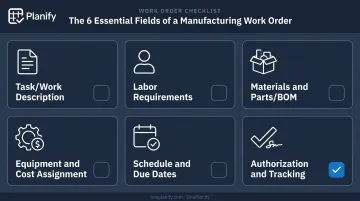
Missing information on a work order doesn't just create confusion; it causes rework, delays, and sometimes safety issues. Six field groups separate a usable work order from a guessing game:
Task/Work Description Instructions need to name the exact product, machine, and scope: "Replace motor assembly on Press 4" leaves no room for interpretation, while "Fix motor" leaves everything open to guesswork.
Labor Requirements Specify headcount, skill level, and any required certifications; assigning an unqualified operator to a complex job is how mistakes happen, and this detail also drives shift planning.
Materials and Parts (BOM Requirements) List part numbers, quantities, specifications, and lot numbers, or risk shortages, overstock, or compliance gaps if the job requires traceability.
Equipment and Cost Assignment Tying the job to a specific work center supports accurate routing, while estimated labor, material, and overhead costs support budgeting before the job starts, not after.
Schedule and Due Dates Start dates, end dates, and cycle times let planners coordinate multiple work orders against finite machine and labor capacity — without one job silently blocking another.
Authorization and Tracking Details Approval sign-offs plus real-time status fields ("In Progress," "On Hold," "Complete") build accountability and a clear audit trail.
Leave any of these six blank, and the work order stops functioning as an authorization document. It becomes a suggestion.
Types of Manufacturing Work Orders
Not every job on the floor is the same, so not every work order should look the same. Here's how the main types break down.
Production Work Orders
This is the core document authorizing creation of a specific product, quantity, or sub-assembly, usually tied to a sales order or a demand forecast. It's the type most floor teams interact with daily, since it carries the routing steps, materials, and due date that scheduling depends on.
Maintenance Work Orders
Maintenance orders split into three categories based on what triggers them:
- Preventive: scheduled, routine maintenance based on time or equipment usage, aimed at reducing failure risk
- Corrective: reactive but plannable; often triggered when a defect is caught during a preventive check and needs its own separate order
- Emergency: unplanned, line-down situations that jump the priority queue
The Department of Energy's maintenance best practices guide treats these as distinct categories, not interchangeable labels, because each carries different scheduling implications.
Other Specialized Types
These orders cover situations that don't fit neatly into standard production or maintenance categories:
- Rework orders: correct defective product so it meets requirements before release
- Inspection/quality orders: document compliance sign-off
- Scrap orders: track material disposed of rather than used
- Setup/changeover orders: capture the transition time between production runs
The Work Order Management Lifecycle
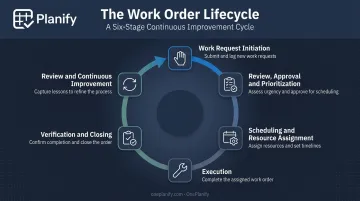
A work order isn't a one-time form. It moves through six stages, and each one matters.
Work Request Initiation: A job originates from a sales order, a forecast, an operator report, or a maintenance flag. Anyone from a planner to a machine operator might raise the initial request.
Review, Approval and Prioritization: A planner checks capacity, material availability, and routing feasibility before approving. Orders get prioritized by due date or customer status.
Scheduling and Resource Assignment: This step ties the order to a specific machine, shift, and crew. Sequencing dozens of interdependent orders against limited capacity is exactly where manual spreadsheets tend to break down.
Execution: Operators log time, materials consumed, and any issues (like a need for rework) as the job runs.
Verification and Closing: A final quality check and supervisor or QA sign-off completes the documentation trail.
Review and Continuous Improvement: Teams analyze labor hours, scrap, and downtime data from closed orders to refine future planning decisions.
The scheduling stage is the pressure point. A single machine breakdown can reshuffle a dozen work orders at once, and every hour that reshuffle takes is an hour production isn't moving. This is where the gap between a spreadsheet and a purpose-built scheduling tool becomes obvious.
Common Challenges & Best Practices for Work Order Management
Vague or Incomplete Work Orders
Missing details cause rework and delays. A NIST case study on historical HVAC maintenance records found that incomplete work order data limited a facility's ability to use its own history for maintenance analysis.
Fix: Use standardized templates that mandate completeness (task, labor, materials, schedule, authorization) before an order is released to the floor.
Scheduling Disruption from Shift Changes and Dependencies
Unplanned downtime, changeovers, and job dependencies constantly reshuffle priorities. A schedule built at 8 a.m. can be obsolete by 10 a.m. This isn't a hypothetical cost, either — ABB's 2023 survey of 3,215 plant-maintenance leaders put the average outage cost at $125,000 per hour for industrial businesses.
Manual, Spreadsheet-Based Scheduling at Scale
Spreadsheets work fine for a handful of jobs. Once order volume and complexity grow, they can't keep up with setup times, shift changes, dependencies, and disruptions happening in real time.
A few examples of what typically gets missed:
- Setup and changeover time between jobs, which can drop a schedule from 85% utilized on paper to 60% on the floor
- Shift boundaries: weekends, holidays, and skeleton third-shift crews
- Operation sequencing: nothing stops a spreadsheet from scheduling Op 20 before Op 10 finishes
- Full replans after a disruption, which can take hours manually and still drop constraints along the way
This is the specific gap purpose-built finite scheduling tools are designed to close. OnePlanify's Planify platform, for instance, models sequence-dependent setup times, enforces shift calendars per work center, and locks multi-operation routing sequences so downstream steps never start early, even after a full disruption replan.
Its "Pretend Mode" lets a planner model a machine breakdown or rush order, preview which jobs slip, and test a few responses before committing, something that simply isn't feasible in Excel. The platform keeps the simplicity of a spreadsheet while adding the constraint logic spreadsheets can't provide.
Weak Version Control and Documentation Gaps
Outdated BOM revisions or skipped approvals create real compliance risk. In regulated production, FDA regulations require written procedures that are followed exactly, with any deviation documented and justified.
Fix: Enforce formal sign-offs at each stage and capture status changes in real time rather than at the end of a shift.
Frequently Asked Questions
What are work orders in manufacturing?
A manufacturing work order is a document that authorizes and details a specific production or maintenance task. It covers what to make, the materials and labor needed, and the timeline for completion.
What should be included on a work order?
The core elements are task description, labor requirements, materials/BOM details, equipment assignment, schedule and due dates, and authorization/tracking details. Missing any of these creates room for error on the floor.
What is the difference between a work order and a purchase order?
A work order authorizes internal production or maintenance tasks. A purchase order is a legal agreement to buy goods or services from an outside vendor. They solve different problems entirely.
What is the difference between a manufacturing order and a work order?
A manufacturing order gives overall production direction, the "what and how much." A work order details the specific tasks, resources, and steps required to fulfill it.
How do you create a manufacturing work order?
Gather the specs and BOM, then assign a unique ID and task description. Define labor, materials, and equipment needs, set the schedule and responsible party, and secure authorization before releasing it to the floor.
Why is scheduling important in work order management?
Scheduling determines whether multiple work orders can actually be completed on time given finite machines, shifts, and labor. Without it, disruptions like a breakdown or rush order cascade into missed deadlines across every dependent job.