Introduction
It's 7 a.m. and you're already three coffees deep. A machine went down overnight, a rush order just landed from your biggest customer, and the spreadsheet schedule from yesterday is now fiction.
Sound familiar? Many manufacturers face this exact scramble daily. Traditional planning tools like ERP and MRP assume unlimited capacity, and spreadsheets can't handle real-time disruptions.
The result: missed deadlines, idle machines, and planners rebuilding schedules from scratch every time something changes.
This guide breaks down what Advanced Planning and Scheduling (APS) software actually is, how it differs from MRP and manual spreadsheets, and the signs that tell you it's time to make the switch.
Key Takeaways
- APS combines planning and scheduling using real constraints: machine capacity, labor, and setups
- Unlike MRP's infinite-capacity assumptions, APS produces schedules you can actually execute
- What-if scenario testing lets planners respond to disruptions in minutes, not hours
- Frequent scheduling conflicts and spreadsheet rework signal it's time for APS
What Is Advanced Planning and Scheduling (APS) Software?
APS software integrates production planning and detailed scheduling into a single system. It uses constraint-based logic and algorithms to generate schedules that reflect what's actually possible on your shop floor, not just what looks good on paper.
Think of APS as the bridge between two worlds: strategic goals (what needs to get made, and by when) and shop floor execution (how and when it actually gets made, machine by machine, shift by shift).
Instead of theoretical assumptions, APS evaluates real conditions:
- Which machines are actually available
- Which operators have the right skills
- Whether materials have arrived
- How long changeovers take
- Which jobs depend on others finishing first
Planning vs. Scheduling: The Two Halves of APS
Planning and scheduling aren't the same thing, even though they get lumped together constantly.
Planning operates on a longer horizon, typically weeks to months. It answers questions like: how much volume should we produce this quarter? What capacity do we need to allocate across product lines?
Scheduling is the detailed, short-term execution layer, working in hours or days. It answers: which machine runs which job today, in what order, with which operator?
A simple example makes this clear. A plant might plan to produce 10,000 units this month based on demand forecasts. Scheduling then decides that Machine 3 runs Job A at 8 a.m., followed by a 45-minute changeover, then Job B at 10:15 a.m. APS handles both layers in one connected system.
Finite vs. Infinite Capacity Planning
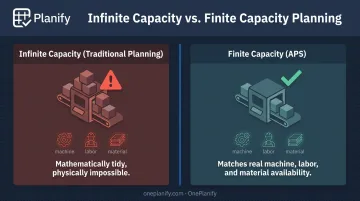
Here's where most legacy tools fall apart. Traditional planning systems use infinite capacity assumptions: they'll happily schedule five jobs onto a machine that can only run three, creating a plan that's mathematically tidy but physically impossible.
APS uses finite capacity planning instead. It only schedules work when the required machine, labor, or material is genuinely available. According to Microsoft's supply chain documentation, finite-capacity scheduling produces a more realistic production schedule than infinite loading because it respects actual resource limits instead of hiding overload.
This matters because real shop floors are messy:
- Setups eat into available machine time
- Shift changes limit when labor is actually present
- One operation can't start until another finishes
Finite scheduling accounts for all of it automatically, adjusting sequences the moment a conflict appears.
How Does APS Differ from Traditional MRP and Spreadsheet Scheduling?
MRP calculates material requirements: what parts you need, and when you need to order them. It's useful for procurement, but it assumes unlimited short-term capacity. That means MRP tells you what should happen, not what can actually happen on a given machine on a given day.
RELEX Solutions notes that legacy MRP workflows often rely on fixed lead times and infinite short-term capacity, forcing planners to export data to Excel just to make the plan workable. That manual balancing act is exactly what APS eliminates.
APS layers constraint-based scheduling logic on top: machine capacity, labor availability, changeover times, shift calendars, and material delivery windows all factor into the schedule it produces.
Here's the comparison in plain terms:
| MRP | APS | |
|---|---|---|
| Purpose | Calculate material requirements | Generate executable production schedules |
| Capacity Assumption | Infinite | Finite, real-world |
| Output | Planned orders | Sequenced, resource-assigned schedule |
| Reaction to Change | Requires manual rework | Automatic re-sequencing |
Spreadsheets have the same core problem, minus even the material planning benefit. They can't dynamically account for dependencies, shift changes, or a machine going down mid-shift. Every disruption means starting over by hand — which is exactly why planners end up rebuilding the same spreadsheet three times a week.
Forward vs. Backward Scheduling
APS tools typically support two scheduling strategies:
- Forward scheduling starts from today and calculates the earliest completion date. Useful when you want to know how soon work can finish.
- Backward scheduling starts from the due date and works backward to find the latest possible start. Useful when hitting a delivery date matters most.
Backward scheduling can leave little buffer if something goes wrong, while forward scheduling risks building excess work-in-process if jobs launch earlier than necessary. Good APS platforms let you toggle between both depending on the situation.
Key Features of a Modern APS Solution
Not all scheduling tools labeled "APS" deliver the same depth. Here's what actually matters:
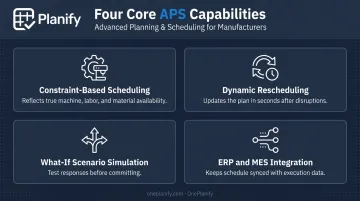
- Constraint-based scheduling — reflects true machine, labor, and material availability rather than theoretical capacity
- Dynamic rescheduling — updates the entire plan in seconds when a machine breaks down, a shift changes, or a rush order lands
- What-if scenario simulation — lets planners model a disruption before committing, comparing multiple response options side by side
- ERP and MES integration — keeps the schedule synchronized with order and execution data instead of living in a silo
Platforms like OnePlanify take this a step further by pairing full finite scheduling with an interface planners can pick up on day one. This closes the usability gap that has historically made APS tools intimidating for smaller teams.
For example, when a machine goes down, a full-featured APS engine doesn't just flag the problem. It re-sequences the entire board, shows exactly which orders will slip and by how much, and lets a planner test a few different responses before locking one in. Planners get a ranked list of trade-offs, not just a warning light.
Benefits of Implementing APS in Manufacturing
The operational payoff from APS shows up fast once real constraints drive the schedule instead of guesswork.
Operational benefits:
- Better machine and labor utilization — no more idle equipment while another line runs overtime
- Shorter lead times through smarter sequencing
- Faster recovery from disruptions like breakdowns or absenteeism
Business benefits:
- Higher on-time delivery rates
- Stronger customer satisfaction from reliable promise dates
- Better decision-making backed by real data instead of gut feel
The results can be significant. In a Siemens-documented customer case, German manufacturer C. E. Schneckenflügel cut customer delivery time by 50% and increased sales by 100% after implementing APS. That's one result, not an industry average, but it shows the scale of improvement possible when scheduling reflects reality rather than assumptions.
The same case study also reported that an earlier APS attempt failed due to a clunky interface. Adoption matters as much as capability. A powerful engine nobody wants to use won't move the needle.
Signs Your Manufacturing Business Needs an APS Solution
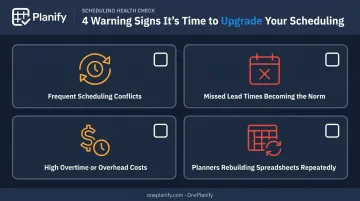
Some warning signs are hard to miss once you know what to look for:
- Frequent scheduling conflicts that pop up weekly, not occasionally
- Missed lead times becoming the norm rather than the exception
- High overtime or overhead costs from constant firefighting
- Planners rebuilding the same spreadsheet multiple times per week
Complexity tends to be the trigger. If your shop runs multiple shifts, has complex multi-step routings, juggles job dependencies, or deals with frequent changeovers, manual tools simply can't keep up.
As OnePlanify's own documentation puts it: "a schedule that looks 85% utilized on paper runs 60% utilized in reality" when changeover time isn't properly accounted for. That gap between paper and floor is usually the clearest sign you've outgrown spreadsheets.
Manufacturers facing these challenges are exactly who OnePlanify built its platform for — one that handles sequence-dependent setups, shift-aware calendars, and multi-operation dependencies without requiring a six-month implementation project.
Frequently Asked Questions
What is the difference between APS and MRP?
MRP calculates material needs assuming infinite capacity and produces planned orders. APS uses finite, constraint-based logic to produce schedules that account for actual machine and labor availability.
What is the difference between APS and ERP?
ERP manages broader business data like orders, finance, and inventory. APS focuses specifically on generating optimized, constraint-aware production schedules, and typically integrates with your existing ERP rather than replacing it.
What is finite capacity scheduling?
Finite capacity scheduling only assigns work when the required machine, labor, or material is genuinely available. This prevents overloaded machines and unrealistic schedules that look fine on paper but fail on the floor.
Is APS software suitable for small and mid-sized manufacturers?
Yes. APS scales from small job shops to large multi-shift operations. Simplified, spreadsheet-familiar platforms now give smaller teams finite scheduling power without a steep learning curve or lengthy consulting engagement.
How does APS handle shop floor disruptions like machine breakdowns or shift changes?
APS automatically re-sequences the entire schedule when disruptions occur, often in seconds. What-if simulation lets planners preview the impact and test multiple responses before committing to a final plan.
Do I still need APS if I already use spreadsheets for scheduling?
Spreadsheets can't dynamically handle constraints, dependencies, or real-time disruptions. As complexity grows, they become increasingly error-prone, which is exactly the gap purpose-built APS tools are designed to close.