This is the moment that separates planning from scheduling — and it's exactly where most shop floors get stuck.
Planning tells you what needs to get built and roughly when. Scheduling tells you exactly which machine, which shift, and which sequence. Most manufacturers treat these as two separate problems, solved with two separate (and often disconnected) tools. Advanced Planning and Scheduling (APS) merges them into one continuously updating system.
This guide breaks down what APS actually is, how it's structured, the benefits worth caring about, common implementation traps, and how to pick a solution that survives contact with your real shop floor.
Key Takeaways
- APS combines strategic planning and real-time scheduling, replacing spreadsheet guesswork.
- A complete APS system combines forecasting, capacity, scheduling, and simulation in one view.
- Manufacturers gain shorter lead times, higher utilization, and consistent on-time delivery.
- The right APS tool matches your shop floor's complexity: setups, shift patterns, and disruptions.
What Is Advanced Supply Chain Planning?
Shop floors often use planning and scheduling interchangeably, but they're not the same job.
- Planning is the strategic layer: deciding what to produce and roughly when, usually in weekly or monthly time buckets
- Scheduling is the tactical layer: sequencing specific tasks and assigning specific machines, people, and shifts to hit that plan
Advanced Planning and Scheduling ties these two layers together using algorithms and live production data, rather than treating them as separate spreadsheets updated on different schedules by different people.
Gartner's own market definition for detailed manufacturing scheduling backs this up. It describes software that plans and organizes production while accounting for material availability, equipment capacity, and labor constraints simultaneously, not sequentially or as an afterthought.
Here's the catch: many legacy APS systems still lean on rigid time buckets and fixed lead times. They'll tell you a job takes "three days" regardless of what's actually running on the machine that week. That's planning dressed up as scheduling, and it falls apart the moment reality doesn't match the assumption.
Planning vs. Scheduling vs. APS at a Glance
| Scope | Typical Tools | Flexibility | |
|---|---|---|---|
| Planning | Weeks to months, aggregate demand | ERP modules, spreadsheets | Low: updates periodically |
| Scheduling | Hours to days, specific resources | Whiteboards, Excel, manual dispatch | Low: manual rework per change |
| APS | Both, continuously reconciled | Constraint-based scheduling engines | High: replans in near real time |
A large share of discrete manufacturers still run scheduling manually or in spreadsheets rather than through automated systems, a pattern confirmed repeatedly in manufacturing trade press. The common thread: spreadsheets can hold a plan, but they can't hold a constraint.
What Is the Structure of Advanced Planning Systems in Supply Chain Management?
An APS system isn't one tool doing one job. It's several functions working off the same data, updating each other in real time instead of waiting for the next weekly meeting.
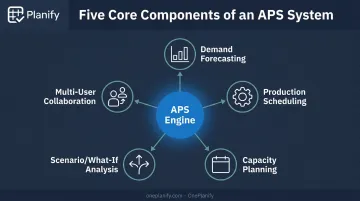
Core Components That Make Up an APS System
Demand forecasting pulls from historical sales, open order pipelines, and statistical or machine learning models to predict what you'll need to produce and when.
Production scheduling is where the detail lives. This is the layer that accounts for:
- Material requirements per operation
- Sequence-dependent setup and changeover times (Job A to Job B might take 45 minutes; Job A to Job C, 15)
- Task dependencies, so downstream operations never start before upstream work finishes
This is precisely where a tool like Planify earns its keep. It models setup, run, teardown, and move time as separate buckets per operation, and it hard-blocks any downstream step from starting until the predecessor is actually done, even after a disruption forces a full replan.
Capacity planning checks real availability: machine uptime, shift coverage, labor, and materials. This includes shift calendars at the work-center level (1st, 2nd, and 3rd shift, weekend closures, holidays, and overtime rules), so a schedule never assumes a machine is running when it's actually shut down for the weekend.
Scenario or "what-if" analysis lets planners test disruptions before they happen. A "pretend mode" simulation, for instance, can model a machine breakdown or a rush order and show exactly which jobs slip and by how much, before anyone commits to a live change.
Multi-user collaboration keeps departments working from one shared schedule instead of five different spreadsheet versions, with role-based access so planners, foremen, and viewers all see the same live board.
How These Components Connect to ERP and MES
None of this works in a vacuum. The ISA-95 standard (the industry framework for enterprise-to-shop-floor integration) defines exactly how business planning systems (Level 4, including ERP) should exchange data with manufacturing operations systems (Level 3).
It specifies shared objects for personnel, equipment, material, schedules, and performance feedback, which is the standardized language APS platforms use to stay in sync with ERP.
In practice, this looks like pulling work orders, routings, and work-center data out of an ERP (Epicor, NetSuite, SAP Business One, and similar systems), running a finite schedule against real constraints, then dispatching sequenced operations back to the floor and exporting labor data back into the ERP.
The APS layer doesn't replace the ERP — it sits alongside it, doing the constraint math the ERP was never built to do.
Key Benefits of APS for Manufacturers and Supply Chains
The value of a good scheduling system shows up in specific, measurable ways.
- Optimized production schedules that minimize idle machine time and reduce the gap between planned and actual utilization
- Better inventory alignment, matching production output to real demand instead of padding safety stock to cover scheduling uncertainty
- Faster response to change, with schedules that adjust in seconds rather than requiring a manual rebuild
- Lower costs from reduced overtime, less scrap from rushed changeovers, and tighter resource use
- More consistent on-time delivery, even when a machine goes down or a rush order lands mid-week
A 2025 systematic review of AI-enabled advanced planning systems found they're linked to greater scheduling accuracy, shorter lead times, and improved resource utilization compared to manual or static planning methods. That advantage comes from reacting to new information in real time, rather than waiting for the next planning cycle.
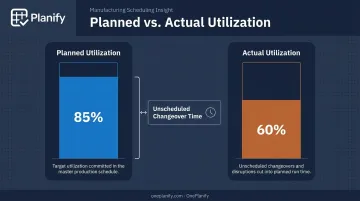
Here's a number worth sitting with: a schedule that looks 85% utilized on paper often runs closer to 60% in reality once you account for the changeover time nobody scheduled around. That gap is the difference between a plan and a schedule that actually holds up.
Disruption response is where this gets tested for real. When a machine breaks or a customer expedites an order, manual replanning in a spreadsheet can take hours, and constraints often get dropped in the scramble.
A finite scheduling engine, like the one built into OnePlanify, works differently. It replans the entire board in seconds while still respecting every setup, shift, and dependency rule, turning a crisis into a five-minute decision instead of an afternoon of firefighting.
Common Challenges in Implementing APS
APS delivers real value, but the path there has known friction points.
System configuration difficulty. Getting the level of detail right is harder than it sounds. Too little detail and the schedule is inaccurate; too much and it becomes unmanageable to maintain.
Traditional APS deployments often burn 6 to 12 months of consulting time and six-figure configuration costs before producing a single usable schedule. That extended setup timeline is the most common reason deployments stall before ever reaching the shop floor.
Resistance to change. Teams comfortable with spreadsheets don't switch overnight. Successful adoption usually depends on:
- Offering interfaces that feel familiar rather than requiring a new mental model
- Providing hands-on onboarding instead of a manual and a login link
- Delivering early wins planners can see and trust immediately
Integration complexity. Connecting APS to existing ERP or MES systems typically demands data cleansing and some workflow redesign. Standardized frameworks like ISA-95 help reduce this friction by defining common data objects, but there's still real work involved in mapping routings, work centers, and shift calendars correctly the first time.
How to Choose the Right APS Solution for Your Shop Floor
Start with an honest audit, not a feature checklist.
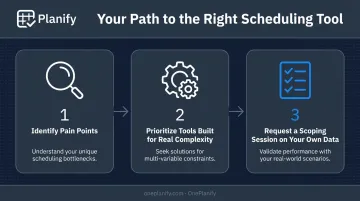
- Identify your actual pain points. Are you missing deadlines? Struggling to adjust when a machine goes down? Losing hours to manual replanning in Excel? Name the specific failure before shopping for a fix.
- Prioritize tools built for real complexity, not idealized conditions. Many scheduling tools assume flat setup times, infinite capacity, and a floor that never closes. Real shops don't work that way. Planify handles sequence-dependent setups, shift calendars, multi-operation dependencies, and disruption replanning through an interface as simple as a spreadsheet.
- Request a scoping session on your own data. Before committing, see the tool run against your actual work orders, changeover matrix, and routing structure. That's the only real test of whether it fits.
A few things worth asking any vendor directly:
- How long does onboarding actually take, start to finish?
- Does the system preserve setup and dependency constraints during a disruption replan, or does it drop them?
- What ERP systems does it already connect to, and how?
For context on what "fast" looks like: some platforms compress onboarding, including ERP connector setup, into weeks rather than the 6-to-12-month timelines common in the category. That work happens inside the onboarding sprint itself, not as a separate IT project.
Frequently Asked Questions
What is advanced supply chain planning?
Advanced supply chain planning uses software and algorithms to integrate demand forecasting, capacity planning, and resource scheduling into one continuously updated system. Instead of separate, static plans, decisions adjust in real time as conditions change.
What is the structure of advanced planning systems in supply chain management?
A complete APS system combines demand forecasting, capacity planning, production scheduling, and what-if scenario simulation. These components share live data, so a change in one area, like a demand spike, automatically ripples through the others.
How is APS different from ERP or MRP systems?
ERP and MRP manage broader business data, materials requirements, and financials. APS focuses specifically on constraint-based scheduling, including setups, shift calendars, and dependencies, and typically works alongside ERP rather than replacing it.
Can small manufacturers benefit from APS, or is it only for large enterprises?
Smaller operations often struggle most with manual scheduling complexity, making them strong candidates for scalable, user-friendly APS tools. Flexible licensing models, such as per-planner or per-work-center pricing, make adoption realistic for lean teams.
What industries benefit most from Advanced Planning and Scheduling?
Manufacturing, retail, and distribution see the biggest gains, particularly operations with multi-step production, sequence-dependent setups, or complex fulfillment chains. Discrete manufacturers with routing dependencies tend to benefit most immediately.
How long does it typically take to implement an APS system?
Timelines vary based on complexity and integration needs, with some deployments stretching 6 to 12 months. Phased, small-batch onboarding can compress that timeline into weeks by handling ERP connections and data setup within the same rollout sprint.