Introduction
Manufacturers know the drill: a machine goes down mid-shift, a rush order lands on your desk, and the spreadsheet you spent all morning building is suddenly worthless.
Setups need resequencing. Shift changes shuffle your labor pool. Dependencies between operations mean one delay cascades through the whole plant.
Manual planning simply can't keep pace with this kind of complexity.
Automated production planning and scheduling replaces guesswork with software that builds, and rebuilds, schedules based on real-world constraints: machine capacity, labor availability, material readiness, and order priority.
Instead of a planner manually juggling rows in Excel, the system calculates a feasible schedule and adjusts it the moment something changes.
This guide covers what automated planning actually means, the three levels of production planning every manufacturer should understand, and the must-have capabilities to look for in scheduling software. It also explains how to choose a solution built for the real messiness of your shop floor, not an idealized version of it.
Key Takeaways
- Automated scheduling respects real capacity limits that spreadsheets ignore
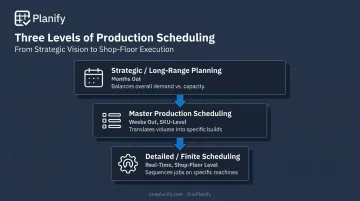
- Production planning operates at three levels: strategic, master scheduling, and detailed finite scheduling
- Disruption handling separates genuine finite scheduling tools from simplified capacity math
- Ease of adoption matters as much as raw power for planners leaving spreadsheets
- Setup time reductions and faster replanning rank among the most measurable automation gains
What Is Automated Production Planning and Scheduling?
Automated production planning and scheduling uses software, algorithms, and real-time data to decide what to produce, when, and in what sequence. It replaces the manual spreadsheet routine most shops have relied on for decades.
Rather than a planner cross-referencing due dates, machine availability, and labor schedules by hand, the system ingests those constraints and generates (or adjusts) a schedule automatically.
Finite scheduling is the core concept that makes this work. Rather than assuming unlimited capacity exists, the software respects actual limits:
- Machine hours available per shift
- Labor headcount and shift schedules
- Raw material on hand
Finite planning caps resource loading at what's genuinely available. Infinite-capacity planning can flag overloads, but it never produces a schedule you could hand to the floor.
At the planning level, automating production means the software weighs these constraints together and produces a feasible, executable schedule with minimal manual rework.
Automation exists on a spectrum:
- Decision support: the system recommends a schedule or flags conflicts, but a planner makes the final call
- Full automation: the system reschedules autonomously based on predefined rules and boundaries
Most manufacturers start with the former, and for good reason. Planners want visibility into what changed and why before a new sequence goes live on the floor.
Tools like OnePlanify's Planify platform sit closer to the decision-support end of that spectrum. The engine can calculate a full-board resequence in seconds, but a planner still reviews and commits the change before it reaches the shop floor.
That balance matters. A system acting entirely on its own can move faster than anyone can verify, while one requiring total manual review at every step can't keep up with real disruption.
The goal, at every level, is the same: turn a high-level demand and capacity plan into something an operator can actually execute on a Tuesday afternoon.
The Three Types of Production Planning
Strategic / Long-Range Planning (Rough-Cut Capacity Planning)
Months before a single work order hits the floor, strategic planning balances overall demand against overall capacity. This is where a manufacturer decides whether to add a shift, buy equipment, or pre-build inventory ahead of a seasonal spike.
Arkieva describes rough-cut capacity planning as a tactical exercise using monthly buckets and aggregated demand, a test of whether key resources can support the proposed plan before anyone commits to detailed execution.
It functions as a sanity check on the whole operation. Get it wrong, and you'll find out three months later when the plant can't keep up with orders it already promised.
Master Production Scheduling (MPS)
Master production scheduling narrows that strategic plan into something closer to reality: SKU-level and order-level schedules, typically built in weekly buckets. MPS translates "we can handle this much volume" into "here's what we're actually building, and when." A furniture maker, for instance, might commit to building 200 dining tables in week twelve despite quarterly capacity assumptions of 800.
Done well, MPS keeps overstock down while still hitting delivery commitments. It's a balancing act between tying up cash in finished inventory and not having enough on hand to ship on time.
Detailed / Finite Scheduling
This is where the shop floor lives. Detailed finite scheduling sequences specific jobs on specific machines, accounting for setups, shift patterns, labor availability, and operation dependencies in real time, not in a monthly bucket.
Finite scheduling reserves actual operation time (setup, run, and teardown) on particular machines, then calculates real start and stop times. More advanced systems layer in labor, tooling, and material constraints simultaneously. A rush order can force a scheduler to resequence a dozen jobs across three machines within minutes.
This is the level where spreadsheets break down fastest, and where automated scheduling software earns its keep.
Why Traditional Production Planning Falls Short
Spreadsheets are good at holding numbers. They're bad at reacting to a machine going down at 2 a.m.
Manual and spreadsheet-based planning can't dynamically respond to disruptions like:
- A supplier delay pushing back raw materials
- An absent operator leaving a station uncovered
- A customer who suddenly needs an order a week early
By the time a planner manually re-sorts rows and rechecks capacity, the shop floor has often already moved on without them.
This isn't a fringe problem, either. Plenty of manufacturers with sophisticated equipment still run production planning entirely out of Excel, patching gaps with tribal knowledge and after-the-fact fixes.
"Island optimization" makes the problem worse. Custom fabricators often optimize individual machines for "parts per hour" while customer-service teams quote delivery dates based on plant-wide averages. Neither measure reflects the actual bottleneck.
In one aerospace fabrication example from that same reporting, orders piled up at a pressure-test tank whenever its operator was out. A cross-trained employee stayed busy nearby on lower-priority bench work. Nobody did anything wrong. They just couldn't see the whole system.
That's the core problem: manual planners optimize their own stage without visibility into how a change ripples across the full production sequence.
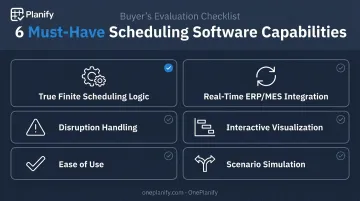
Must-Have Capabilities of Automated Production Scheduling Software
Not all scheduling software actually solves the problem above. Here's what separates real finite scheduling tools from a spreadsheet with a nicer interface.
True finite scheduling logic. The engine needs to account for setups, changeovers, shift patterns, and machine/labor dependencies simultaneously, not as separate calculations. A changeover from Job A to Job B might take 45 minutes, while Job A to Job C takes just 15.
Ignore that difference, and the floor gets a schedule that looks 85% utilized on paper but runs at 60% in reality.
Real-time ERP/MES integration. Schedules should update automatically when orders, materials, or machine status change in your ERP, not require a planner to manually re-import data every morning. Look for direct connectors to systems like Epicor, SYSPRO, NetSuite, or SAP Business One rather than a generic CSV dump.
Disruption handling that doesn't start from zero. When a machine goes down or a rush order lands, the software should re-sequence affected jobs in seconds while preserving every setup, shift, and dependency constraint already built into the schedule.
Interactive visualization. Planners need to see the schedule, not parse it. Drag-and-drop Gantt-style views and full-board impact previews let a planner spot a problem, and fix it, in the time it takes to glance at a screen.
Ease of use that matches the power underneath. A tool can be brilliant on paper and useless in practice if it takes a six-month consulting engagement to configure.
This is the gap OnePlanify built Planify to close: comprehensive finite scheduling wrapped in a spreadsheet-familiar workspace, so planners already comfortable in Excel can run a real schedule without a steep learning curve.
Scenario simulation. Before committing to a change, planners should be able to model it (a demand surge, a shift change, an order swap) and see the downstream impact before it goes live.
Planify's "Pretend Mode" is built around this idea: model a disruption, preview which orders slip and by how much, then commit only the version you trust.
Key Benefits of Automating Production Planning
Automating production scheduling delivers measurable gains on the shop floor, not just a nicer interface.
Improved on-time delivery. Schedules built on real constraints, not static assumptions, mean delivery dates reflect what the floor can actually do this week, not what a spreadsheet formula assumed months ago.
Reduced changeover and setup time. Sequencing similar jobs together cuts unnecessary re-tooling. Turkish glass manufacturer Ortakci Cam saw a 25% reduction in machine setup times after moving from spreadsheets to finite-capacity scheduling. The same shift also delivered a 40% increase in customer-service levels and a 20% productivity gain.
Better resource and labor utilization. Matching shift patterns and machine capacity to actual demand, instead of assuming every shift and machine is always available, means fewer idle machines and less last-minute overtime.
Faster response to disruption. Manual rescheduling in Excel can take hours and routinely drops constraints along the way. Scheduling platforms like OnePlanify can resequence an entire board in seconds, letting planners test multiple responses to a disruption and commit the least damaging one within minutes.
Reduced planner burnout. When scheduling rules, setup matrices, shift calendars, and routing dependencies live in the system instead of one planner's head, the operation isn't held hostage by turnover or a single person's vacation schedule.
Choosing the Right Automated Scheduling Solution
Not every scheduling tool is built for the same shop floor. A few things worth checking before signing a contract:
- Does it model real shop floor messiness? Ask how the system handles sequence-dependent setups, multiple shifts, routing dependencies, and mid-week disruptions, not just idealized capacity math
- Will planners actually use it? The best scheduling logic in the world is worthless if it sits unused because it's too complicated
- Can you see it run on your own data? A canned demo on someone else's work orders won't tell you much about your operation
This is the gap OnePlanify built Planify to fill. It handles setups, shift changes, dependencies, and disruption, yet feels as familiar as a spreadsheet from day one.
Onboarding runs in small batches. Scheduling Specialist Dave Luckner, who brings hands-on experience across major ERP and CAD/CAM platforms, helps teams move off spreadsheets without the usual months-long consulting slog.
Frequently Asked Questions
What does it mean to automate production?
Automating production means using software and algorithms to plan, sequence, and adjust manufacturing activities with minimal manual input. The system pulls in real-time data, such as orders, capacity, and material status, to generate a feasible schedule.
What are the three types of production planning?
Production planning happens at three levels: strategic/long-range capacity planning (months out), master production scheduling (weeks out, SKU-level), and detailed finite scheduling (shop-floor level, machine-by-machine).
What is the difference between production planning and production scheduling?
Planning determines what and how much to produce over a longer horizon, balancing demand against overall capacity. Scheduling assigns specific jobs to specific machines and time slots, accounting for setups, labor, and dependencies in real time.
What industries benefit most from automated production scheduling?
Discrete and process manufacturers with complex changeovers, multiple dependencies, or tight due dates see the biggest gains—think custom fabrication, job shops, or metal and glass production. Automation delivers the most value wherever shared machines create competing constraints.
Do small and mid-sized manufacturers need automated scheduling?
Often more than larger ones. Small and mid-sized shops typically lack a dedicated planning team, so accessible, low-cost scheduling tools remove the resource barrier that's historically kept them on manual methods.
How long does it take to implement production scheduling software?
Timelines vary by complexity. Traditional ERP-embedded scheduling modules can take six to twelve months of consulting, while purpose-built scheduling tools can get a shop running a real schedule within weeks.