But results vary wildly. Some Excel schedules hold up for years. Others look clean on screen while the shop floor quietly falls apart underneath them, because of how the spreadsheet models changeovers, calendars, and job dependencies.
This guide covers whether Excel is still the right method for your shop, what it actually takes to build a working model, the exact steps to build one, the variables that make or break accuracy, and the mistakes that sink most Excel schedules within a few months.
Key Takeaways
- Finite scheduling in Excel tracks cumulative workload against capacity per resource, not simple duration math.
- It works well for single-bottleneck shops, low SKU counts, and one or two constrained resources.
- Accuracy depends on changeover times, resource calendars, and job dependencies; generic averages break the model.
- Repair time, not build time, becomes the real bottleneck once disruptions start piling up.
- Spreadsheets remain common in production planning, though no reliable industry-wide percentage exists; treat prevalence claims with caution.
How to Build a Finite Capacity Schedule in Excel
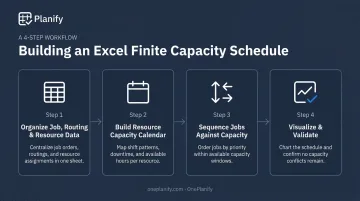
Building a working schedule takes four steps: get your data right, build a real calendar, sequence jobs against capacity, then visualize and check for errors before you release it to the floor.
Step 1: Organize Your Job, Routing & Resource Data
Start with a clean job list : quantities, due dates, and the exact operations each job needs to pass through.
- Pull run-time and setup/changeover data from actual machine performance, not legacy ERP standard times that were set years ago and never revisited
- Confirm resource assignment for every operation
- Map sequencing dependencies between operations before you touch a single formula
Skipping this step is the single most common reason Excel schedules go stale within months. Stale inputs produce a mathematically tidy schedule that has nothing to do with what's actually happening on the floor.
Step 2: Build the Resource Capacity Calendar
Set up a dedicated calendar tab per resource, listing shift hours, breaks, and planned downtime or maintenance windows.
- Add calendar exceptions: holidays, added overtime shifts, unplanned shutdowns
- Keep time values consistent: enter a two-hour job as 0.0833 (2/24), not "2," or your date math breaks
- Rebuild this tab every planning cycle, not once a year
This calendar becomes the backbone of every capacity calculation that follows. Get it wrong here, and every downstream formula inherits the error.
Step 3: Calculate Cumulative Workload and Sequence Jobs
Stack job hours (workload) and calendar hours (capacity) into one sortable table. Then calculate a running cumulative total for each.
- List every job's required hours in sequence, alongside cumulative available capacity hours for that resource
- Sort by cumulative value to find the exact point where available capacity catches up to demand: that's your finish time for each job
- Choose a scheduling direction: forward scheduling starts now and calculates finish dates, while backward scheduling starts from the due date and works backward to find the latest safe start
Forward scheduling suits shops that prioritize flexibility. Backward scheduling suits shops with fixed customer deadlines that can't slip.
Step 4: Visualize and Validate the Schedule
Build a Gantt-style view using conditional formatting or stacked bar charts, organized by resource and date.
- Manually scan for overlapping time blocks on the same resource; Excel won't flag these for you
- Add a check column comparing planned completion against original due dates to catch at-risk orders before release
- Re-validate every time you touch the underlying data
This last step is where most planners discover whether their formulas actually hold up under real job volume.
When Excel Works for Finite Capacity Scheduling — and When It Breaks Down
Excel is a defensible scheduling tool when the job is closer to transcription (recording known rules) than calculation (weighing competing constraints against each other in real time).
Cambridge's Institute for Manufacturing defines finite capacity scheduling as an approach that takes capacity into account from the outset, basing the schedule on what's actually available rather than what's theoretically possible. Excel can do that math. It just can't enforce it automatically.
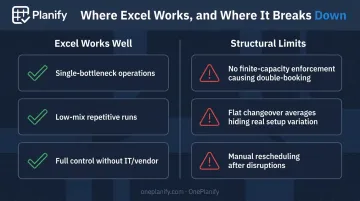
Excel tends to work well for:
- Single-bottleneck operations with one dominant constraint
- Low-mix, repetitive production runs
- Shops needing full control without an IT project or vendor contract
Where the structural limits show up:
- Excel has no finite-capacity logic, so it can't stop double-booking a resource across overlapping jobs
- Sequence-dependent setups can't be captured by a flat changeover average: job A into B may cost 45 minutes; A into C, only 15
- Rescheduling after a disruption is entirely manual, so repair time, not build time, becomes the bottleneck as job count grows
Here's the part that catches most planners off guard: an Excel schedule doesn't crash when it exceeds its limits. It keeps producing a clean, confident-looking plan. Nothing turns red, and no formula throws an error.
The schedule just drifts away from shop-floor reality until WIP piles up, usually weeks after the underlying assumptions stopped being true, and late orders expose the gap.
What You Need: Data, Skills & Key Parameters for Accurate Excel Scheduling
A finite capacity schedule in Excel is only as reliable as the data and formulas feeding it. Garbage in, confident-looking garbage out.
Data & System Requirements
- Accurate routings and resource calendars, plus job-level run times pulled from actual machine performance
- A structured changeover/setup matrix — not a single average figure that hides the real variation between job pairs
- Working knowledge of SUMIFS, cumulative sum formulas, and sorting logic, or Power Query if you're merging tables at any real scale
Key Parameters That Affect Results
| Parameter | Why It Matters | Impact If Ignored |
|---|---|---|
| Changeover/setup time by sequence | Resequencing the same jobs differently can recover or lose a full shift of capacity | An average changeover figure silently overstates available capacity |
| Resource calendar accuracy | Capacity math depends entirely on correct available hours per time bucket | Missed exceptions make jobs look on-schedule when the resource isn't even available |
| Job dependencies & routing sequence | Downstream resources must be free before upstream work can release | Produces a schedule that's arithmetically tidy but physically impossible to run |
| Scheduling direction | Determines whether you optimize for earliest completion or latest safe start | Wrong direction for your production profile inflates WIP or hurts due-date reliability |
These parameters play out in real production numbers, not just theory.
A 2022 case study of a UK ready-meal factory running more than 70 product lines tracked the impact of cutting changeover time. Using SMED and line-hopping techniques, the team dropped setup time from 29 minutes to just under 9, a nearly 68% reduction. That change alone saved an estimated 3,300 production hours per year.
That's the scale of impact changeover time has on real capacity. It's exactly the variable a flat average erases from your spreadsheet.
Common Mistakes & Troubleshooting in Excel-Based Finite Scheduling
Most Excel scheduling failures trace back to three habits:
- Using a single average changeover time instead of a sequence-dependent matrix, which silently overstates true available capacity
- Skipping calendar exceptions like holidays or unplanned maintenance, producing a schedule that looks feasible on paper but isn't
- Patching instead of rebuilding after a disruption, which degrades schedule coherence one patch at a time
A documented case study of a Cincinnati contract machine shop found that relying on spreadsheets and printouts forced staff to recreate data across systems. Estimates diverged from shop floor reality, causing duplicate entry and inaccuracies. The same failure pattern shows up outside a single Excel workbook: disconnected data sources drift apart over time.
Troubleshooting Common Issues
Problem: Gantt chart shows overlapping jobs on the same resource.
Likely cause: no overlap-check formula exists in your cumulative sequencing logic. Fix: add a validation column that flags any resource-date combination appearing more than once.
Problem: the schedule looks accurate, but the shop floor can't execute it.
Likely cause: capacity data (run times, calendars) is stale or based on outdated standards. Fix: refresh run-time and calendar inputs from real production data before every planning cycle, not once a quarter.
Alternatives to Excel for Finite Capacity Scheduling
As constraint complexity grows (multiple bottlenecks, frequent disruption, sequence-dependent setups), other methods start beating a spreadsheet on pure efficiency.
ERP/MRP planning modules work well when the priority is materials planning and order management rather than shop-floor sequencing. The trade-off: most ERP planning modules default to infinite capacity logic, so they don't actually solve the problem Excel was already struggling with.
Dedicated finite capacity scheduling software earns its place once you're dealing with multiple constrained resources, sequence-dependent changeovers, shift changes, and disruptions that demand fast rescheduling. It requires upfront data setup, but removes the manual rebuild burden that makes Excel schedules degrade over time.
This is where Planify, built by OnePlanify, fits for shops that have outgrown spreadsheet limits. It's built for the messy realities Excel can't model:
- Sequence-dependent setup times: Job A into Job B costs 45 minutes, but Job A into Job C costs 15, so compatible jobs get grouped to cut total changeover time
- Shift-aware calendars per work center, with automatic handling of holidays, weekend closures, and overtime authorization
- Predecessor locks on multi-operation routings, so downstream work never gets scheduled ahead of upstream completion
- Disruption replanning in seconds through a "Pretend Mode" that previews which orders will slip before you commit anything
A schedule that looks 85% utilized on paper often runs closer to 60% in reality once setup time and dependencies are properly accounted for, which is exactly the gap Planify is built to close.
Onboarding runs alongside your existing ERP (Epicor, SYSPRO, NetSuite, and others), pulling work orders and routings directly rather than replacing what you already have. Subscriptions start at $165 per month.
Excel remains a solid starting point when your constraints are genuinely simple. But once rebuilding the schedule costs more time than building it did in the first place, that's your signal to look at a purpose-built tool.
Frequently Asked Questions
Can I use Excel as an ERP?
Excel can mimic some ERP functions, like tracking orders or inventory, but it lacks real-time integration, multi-user data integrity, and native finite capacity logic. Treat it as a supplement to your ERP, not a full replacement.
Can Excel handle finite capacity scheduling?
Yes, for simple, low-constraint environments using cumulative workload-versus-capacity formulas. It requires ongoing manual maintenance, though, and breaks down fast as constraints multiply.
What is the difference between finite and infinite capacity scheduling in Excel?
Infinite capacity assumes unlimited resource availability and schedules from due dates backward. Finite capacity checks actual available hours before scheduling a job, which prevents double-booking a resource.
How do you calculate available capacity in Excel?
Sum available shift hours per resource into a running total over time, then compare it against total job workload hours for the same resource.
When should a manufacturer move beyond Excel for scheduling?
Watch for these signals: rebuilding the schedule takes longer than building it did, orders run chronically late despite a "clean" plan, or one person is the only one who understands the file.
Does Excel support real-time schedule updates when disruptions happen?
No. Excel schedules are static by default and require manual rebuilding after any disruption, unlike dedicated finite scheduling tools that can re-sequence automatically when conditions change.