That split matters more than it looks. The scheduling method a shop uses shapes on-time delivery, labor costs, and how well the floor absorbs a rush order or a machine breakdown at 2pm on a Friday. One manufacturer, Dauper, was spending 2 to 5 days building a single month's production schedule manually before switching to automated finite scheduling, a process that now takes about 10 minutes.
This article breaks down manual and automatic scheduling side by side, so you can figure out which fits your shop, or whether you need both.
Key Takeaways
- Manual scheduling stays flexible and intuitive, but doesn't scale with job volume
- Automatic scheduling adds speed and constraint-checking, but only as good as its data
- Your best choice depends on job complexity, volume, and how often schedules change
- Top-performing shops often blend both: automated baseline, human judgment for the exceptions
- OnePlanify aims to make finite scheduling as simple as the spreadsheet it replaces
Manual vs Automatic Scheduling: Quick Comparison
Here's how the two methods stack up across the factors that matter most on the shop floor.
| Factor | Manual Scheduling | Automatic Scheduling |
|---|---|---|
| Speed | Hours to build or update a schedule | Seconds to generate or regenerate a full schedule |
| Cost | Low upfront cost, hidden cost in labor hours | Software investment, offset by time savings |
| Constraint handling | Relies on scheduler memory; easy to miss conflicts | Automatically checks machines, operators, tooling, materials |
| Scalability | Fine for a handful of jobs; breaks down past that | Handles small or large job counts equally well |
| Disruptions | Excellent for unwritten rules and judgment calls | Consistent, rule-based; may need override for true exceptions |
The pattern here isn't subtle: manual scheduling wins on nuance and judgment, while automatic scheduling wins on speed and consistency. That trade-off determines your answer, and it looks different depending on your shop's size and complexity, which we'll unpack next.
What is Manual Scheduling?
Manual scheduling is exactly what it sounds like: a person assigning jobs to machines and time slots by hand, using a whiteboard, a spreadsheet, or a paper dispatch list. No algorithm. No software running constraints in the background. Just a scheduler's experience and a lot of eraser marks.
It's still common in smaller shops for a simple reason: it works, up to a point.
Core benefits:
- Taps into tacit knowledge that's never been written down, like which operator runs a certain machine faster or which customer always needs their order first
- Requires zero technology investment or training curve
- Adapts instantly to one-off situations a rulebook could never anticipate
Common variations include:
- Whiteboard or magnetic board scheduling on the shop floor
- Excel-based scheduling with formulas and color-coding
- Informal "mental" scheduling, where an experienced planner just knows the plan
- Verbal handoffs at shift change, passed from one supervisor to the next
Use Cases of Manual Scheduling
Manual scheduling fits best in low-volume, low-complexity environments. Think a handful of machines, a small job count, and highly custom or one-off production runs where flexibility beats raw speed.
Small job shops and prototype manufacturers are where this method remains dominant. As The Fabricator's case study on metal fabrication job shop scheduling shows, a shop juggling multilevel bills of material, shared resources, and shifting job mixes can still track that complexity in someone's head, at least for a while.
Visual, non-software scheduling also survives in shops where sequencing logic is simple, like using empty downstream space or available storage bins as informal signals for what runs next.
The catch: this approach doesn't degrade gracefully. It works fine at 10 jobs and starts falling apart around 40, especially once shift changes, tooling conflicts, and rush orders start piling on top of each other.
What is Automatic Scheduling?
Automatic scheduling, more precisely called finite capacity scheduling, uses software algorithms to place jobs on machines based on defined rules, priorities, and real constraints. Instead of a person mentally juggling every variable, the system does the juggling and spits out a schedule in seconds.
This matters more now than it did a decade ago. Margins are tighter, job mixes are more varied, and manufacturers scaling past a certain size simply can't keep pace with manual methods.
Core benefits:
- Speed: schedules that took days now take minutes
- Consistency: the same rules applied the same way, every time
- Constraint-awareness: machine, operator, tooling, and material availability checked automatically
- What-if scenarios: test a response to a disruption before committing to it
Variations include:
- Basic scheduling add-ons bundled into ERP systems
- Advanced Planning and Scheduling (APS) systems
- Purpose-built finite scheduling tools like OnePlanify, designed around the messy realities of setups, shift changes, dependencies, and disruption
Use Cases of Automatic Scheduling
Automatic scheduling earns its keep in multi-machine, multi-constraint shops with higher job volumes, frequent changeovers, or shift complexity. Metal fabrication, CNC machining, and electronics manufacturing with complex routings are where this method tends to dominate.
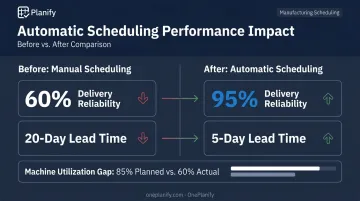
An electronics manufacturer managing 150 assemblies and 3,000 processes a month on spreadsheets and meeting notes switched to finite capacity scheduling that accounted for actual capacity limits and priority logic.
Delivery reliability jumped from 60% to 95%, and lead time dropped from 20 days to 5 (Siemens's case study on this shift).
That's not a fluke result. It happens when a system respects setup time, shift calendars, and job dependencies instead of assuming infinite capacity, which is the blind spot in most generic ERP scheduling modules.
Those modules often produce a schedule that looks 85% utilized on paper but runs closer to 60% in reality, because changeover time was never factored in.
Manual vs Automatic Scheduling: Which Is Better for Your Shop?
There's no universal winner here. The right answer depends on a handful of concrete factors:
- Job volume and mix: a dozen repeat orders a month versus hundreds of custom jobs
- Number of constraints: machines, operators, tooling, materials all interacting
- Frequency of disruptions: how often rush orders or breakdowns hit the plan
- Scheduler bandwidth: one overworked planner or a dedicated team
- Budget: for software, training, and ongoing licensing
Choose manual scheduling if: you run a small, low-complexity shop with infrequent changes and a scheduler who genuinely knows the floor cold.
Choose automatic scheduling if: you're scaling, juggling multiple constraints, or getting hit with rush orders and shift changes often enough that manual updates can't keep up.
A Real-World Example: Federal Corporation
Federal Corporation, a Taiwan-based tire manufacturer, was running molding, forming, and sulfuring operations on manual Excel schedules. As order volume grew more diverse and rush orders became routine, the spreadsheets couldn't keep pace, and production stopped syncing cleanly with sales and inventory.
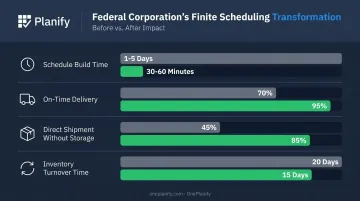
The company adopted a finite scheduling approach that synchronized bottleneck operations and accounted for shared resource constraints. The results, documented in Federal Corporation's case study:
- Schedule build time dropped from 1-5 days to just 30-60 minutes
- On-time delivery rose from 70% to 95%
- Direct shipment without storage increased from 45% to 85%
- Inventory turnover time shortened from 20 days to 15 days
That's a single company's results, not an industry average, but it shows the mechanism: when the schedule respects real constraints and updates fast, the operational metrics that actually matter start moving.
If your shop is starting to feel like Federal Corporation's "before" picture, spreadsheets buckling under rush orders and diverse job mixes, that's usually the signal to look at finite scheduling.
OnePlanify was built for exactly that middle ground: shops that have outgrown Excel but don't want a six-figure, year-long APS rollout. It handles setups, shift changes, dependencies, and disruption without the overhead legacy tools typically demand.
Conclusion
Manual and automatic scheduling aren't competing for a universal crown. The real question is whether your current method matches your shop's complexity, job volume, and where you're headed.
A five-machine prototype shop and a 40-machine job shop running three shifts have completely different needs. Forcing either into the wrong method wastes time or money.
Many manufacturers land somewhere in the middle: an automated baseline schedule, with a human stepping in for the exceptions no algorithm could anticipate. OnePlanify automates that baseline schedule while making it simple to adjust when a rush order or machine outage hits.
Whatever you choose, the scheduling method you run directly affects cost control, on-time delivery, and how well your floor absorbs the next disruption. That's worth evaluating before deciding what comes next.
Frequently Asked Questions
What is the difference between manual schedule and auto schedule in MS Project?
In Microsoft Project, manually scheduled tasks keep their dates fixed regardless of dependency changes. Automatically scheduled tasks recalculate dates based on predecessors, constraints, and durations whenever something shifts upstream.
What are the three types of project schedules?
Common schedule types include master schedules (summary-level view of major deliverables), milestone schedules (key dates only), and detailed working schedules used for day-to-day execution. Terminology can vary by project and industry.
Can I switch from manual to automatic scheduling without losing existing data?
Most scheduling tools support a gradual transition by importing your existing work orders, routings, and work-center data. OnePlanify, for example, pulls this data directly from your ERP, eliminating manual re-entry.
Which scheduling method reduces downtime more effectively on the shop floor?
Automatic scheduling reduces disruption impact through constraint-aware planning that catches conflicts before they happen. That said, manual oversight is still needed to confirm the plan makes sense for true one-off exceptions.
Do small manufacturers really need automated scheduling software, or is manual enough?
Small shops with low job volume and few constraints can often manage fine with manual scheduling. Growth in job complexity, machine count, or disruption frequency is usually the tipping point that pushes shops toward automation.
How does automatic scheduling handle machine breakdowns or urgent rush orders?
Automated systems can recalculate and cascade schedule changes across the entire board in seconds, preserving setup and shift constraints. A planner still reviews and confirms the adjustments before committing them to the live floor.