Introduction
A rush order lands on a Tuesday afternoon. The scheduler slots it in, bumps a changeover, and figures the day will sort itself out. By Thursday, three jobs are late, a machine sits idle waiting on tooling, and nobody can explain why.
This is the reality in most machine shops, even ones running six-figure CNC equipment. The real bottleneck is usually the plan, not the equipment.
Many shops have invested in faster spindles, better tooling, and skilled operators, yet they still schedule everything on a whiteboard or a spreadsheet grid. Those tools can't keep pace with setups, shift changes, multi-operation dependencies, and the disruptions that hit a shop floor every single week.
This guide breaks down what machine shop scheduling actually involves, why it's uniquely difficult, what it costs your business when it goes wrong, and how to evaluate a better approach.
Key Takeaways
- Machine shop scheduling is a finite-capacity problem that spreadsheets can't solve
- Setup times, job dependencies, and bottlenecks compound faster than tools can track
- Top-performing shops hit 75% median spindle utilization versus 65% for the rest
- Finite scheduling software replans disruptions in seconds instead of hours
What Is Machine Shop Scheduling?
Machine shop scheduling is the process of assigning specific jobs, operations, machines, tooling, and labor to time slots on the shop floor, with the goal of hitting delivery dates within real capacity limits.
It's often confused with production planning, but the two aren't the same thing.
| Aspect | Production Planning | Scheduling |
|---|---|---|
| Time horizon | Weeks to months | Hours to days |
| Core question | What do we need to make, and roughly when? | Which job runs on which machine, in what sequence, starting when? |
| Output | High-level production targets | Minute-by-minute shop floor sequence |
Planning sets direction. Scheduling executes it, operation by operation, at the resolution the shop floor actually runs on.
Academically, this detailed sequencing problem is known as the job-shop scheduling problem. It's been studied in operations research for decades, and the math isn't forgiving. Foundational complexity research classified job-shop scheduling as NP-hard, meaning there's no shortcut formula that guarantees an optimal schedule as job counts and machine counts grow.
That's not a knock on your scheduler's skill. It's a mathematical explanation for why manual, ad hoc scheduling methods start breaking down the moment complexity increases past a handful of jobs and machines.
Why Machine Shop Scheduling Is So Complex
A job shop isn't a fixed production line. Every job can have a different routing, tooling needs, and due date, which stacks several layers of constraints on top of each other.
Setup, Changeovers, and Job Dependencies
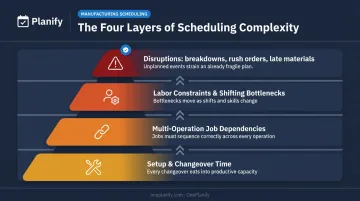
Every changeover eats into available machine time. Grouping similar jobs together reduces how often a machine needs to switch tooling, fixtures, or programs. Skip that grouping, and setup time consumes capacity that never shows up on paper.
Setup time varies widely by shop and part complexity, but it's consistently one of the largest hidden capacity drains on a CNC floor. For example, a schedule that looks 85% utilized on paper can run closer to 60% once real changeover time is factored in.
Setup is only one layer, though. Most jobs also aren't single-operation: a part might need to move through milling, then welding, then finishing, in a fixed order.
- Op 10 has to complete before Op 20 can start
- A delay at any step pushes every downstream operation
- Cross-department handoffs (mill to weld to finish) multiply the ripple effect
Labor Constraints and Shifting Bottlenecks
Machines don't run themselves. Operator skill requirements, multiple shift patterns, and absenteeism layer another constraint on top of raw machine capacity. A machine being "available" means nothing if the operator qualified to run it isn't on the clock.
Labor isn't the only moving target, either. Unlike an assembly line with one fixed constraint, the bottleneck in a job shop shifts: one week it's the CNC mill, the next it's the welding cell, depending entirely on the current job mix. A schedule built around last month's constraint is already outdated.
Disruptions and the Limits of Manual Planning
Machine breakdowns, late materials, and expedited customer orders force constant rescheduling. One disruption can throw off an entire day's plan, and by the time a human replans it manually, the disruption has already caused a second one.
Spreadsheets and whiteboards can't absorb that kind of chaos in real time. They typically assume unlimited capacity and can't simultaneously account for machine availability, tooling conflicts, and labor limits the way true finite scheduling logic does. That gap between what the plan says and what the floor can actually execute is where most late jobs originate.
The Business Case for Proper Scheduling
Better scheduling isn't a nice-to-have. It shows up directly in utilization, quality, retention, and revenue.
Optimized Machine Utilization
Effective scheduling minimizes idle machine time by keeping the right job queued at the right machine, at the right moment. Among 277 shops surveyed by Modern Machine Shop's Top Shops benchmarking, top-performing shops reported median spindle utilization of 75%, compared to 65% for other respondents. That 10-point gap represents real, recoverable capacity most shops are leaving on the table.
Smoother Workflow and Reduced Downtime
Well-sequenced jobs mean fewer bottlenecks and more consistent part quality, since operators aren't scrambling between poorly staged jobs and rushed setups. Batching similar jobs together also cuts the number of changeovers needed per shift, leaving more spindle-on time and less non-value-added labor.
Scheduling preventive maintenance into planned windows, rather than reacting after a breakdown, also avoids losing critical production time when a job is already mid-run.
Higher Labor Productivity and Retention
Poor scheduling frustrates operators who show up to conflicting priorities, missing materials, or last-minute changes. Gallup's workforce research found that 42% of voluntary employee turnover is preventable, with 9% of departing workers citing staffing, workload, or scheduling issues as a factor. A shop floor that runs predictably is one operators are more likely to stay on.
Reliable On-Time Delivery
Consistent scheduling builds customer trust and wins repeat business. Shops that can't deliver reliably lose orders to competitors who can. In a market with plenty of capable machine shops, delivery reliability is a genuine differentiator.
Common Approaches to Scheduling (and Where They Fall Short)
Not all scheduling methods handle complexity the same way. Here's how the three main approaches compare.
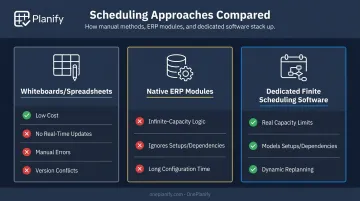
Whiteboards and Spreadsheets
The appeal is obvious: low cost, no software to learn, everyone already knows how to use Excel. But the limitations show up fast.
- Manual errors creep in as job counts grow
- No real-time updates when something changes on the floor
- Setup times, dependencies, and shift calendars aren't modeled at all
- Version conflicts multiply as more people edit the same spreadsheet or whiteboard
Native ERP Scheduling Modules
Many ERPs bundle a basic scheduling module, but most run on infinite-capacity logic rather than real constraints. Common gaps include:
- Schedules work orders without checking whether a machine is already booked
- Ignores setup times, shift patterns, and dependency chains
- Requires months of configuration before it's usable at all
Dedicated Finite Scheduling Software
Purpose-built finite scheduling tools model machines, tooling, labor, and job dependencies simultaneously, then adjust dynamically as conditions change. This is the category OnePlanify operates in.
Its scheduling engine solves these gaps directly:
- Enforces real finite capacity at the work-center level, so no machine gets double-booked
- Models sequence-dependent setup times: Job A to Job B might take 45 minutes, Job A to Job C only 15
- Treats multi-operation routings as first-class constraints through a predecessor lock, so no downstream operation starts before its upstream step finishes, even after a full disruption replan
Best Practices for Building a Reliable Schedule
A reliable schedule functions as a living system, reacting continuously as shop floor conditions shift.
- Maintain real-time visibility into job and machine status so schedulers can react the moment something shifts on the floor, rather than discovering a problem hours later
- Build in automatic prioritization logic using due dates, rush orders, and customer tiers so jobs resequence intelligently without a manual recalculation every time priorities change
- Run what-if scenarios before committing changes using tools like OnePlanify's Pretend mode to preview exactly which jobs will slip before touching the live schedule
- Integrate scheduling with existing ERP and resource systems so labor, tooling, and material data flow into the plan automatically instead of living in disconnected spreadsheets
- Preserve manual override ability since automated logic only gets you 90% of the way there and schedulers still need to make judgment calls machines can't
- Right-size buffers at bottleneck resources to absorb normal variability without flooding the floor with excess work-in-process or starving the constraint machine
Choosing Scheduling Software That Fits Real Shop Floor Complexity
Not every tool marketed as "scheduling software" actually models the constraints that matter on a real machine shop floor.
Genuine Finite Scheduling Capability
Prioritize software that accounts for setups, shift patterns, tooling availability, and job dependencies simultaneously. Oversimplified, infinite-capacity logic will produce a plan that looks clean on screen and falls apart the moment it hits the floor.
Ease of Use Your Team Will Actually Adopt
A powerful system nobody opens is worthless. OnePlanify delivers comprehensive finite scheduling that's as easy to use as a spreadsheet, handling the messy realities of setups, shift changes, dependencies, and disruption without extra complexity.
Planners get a workspace they can run on day one, with onboarding structured to have a real schedule live within weeks rather than months.
How the Platform Handles Disruption
Ease of use only pays off if the system holds up when the unexpected happens. The real test of any scheduling software is how fast it replans when a rush order, breakdown, or material delay hits. Look for a platform that can resequence the entire board in seconds, not hours, while preserving every setup, shift, and dependency constraint it had before the disruption.
Frequently Asked Questions
What is shop scheduling?
Shop scheduling assigns jobs, machines, tooling, and labor to specific time slots based on real capacity limits. It turns a production plan into an executable, day-to-day sequence on the floor.
What is the most used scheduling software?
Many shops still default to spreadsheets or basic ERP modules out of habit or cost. Purpose-built finite scheduling platforms, including OnePlanify, are gaining adoption because they model real shop floor complexity instead of assuming unlimited capacity.
What is the difference between finite and infinite capacity scheduling?
Infinite capacity scheduling ignores real resource limits and schedules work regardless of whether a machine or worker is actually available. Finite capacity scheduling respects actual machine, labor, and tooling availability when building the plan.
Can you schedule a machine shop with Excel or spreadsheets?
Spreadsheets can work for very small, simple shops with few jobs and minimal dependencies. They tend to break down quickly as job counts, multi-operation routings, and disruptions increase.
How often should a machine shop update its schedule?
Schedules should update in real time or near real time as jobs progress, disruptions occur, or new orders arrive. A schedule fixed once per day or week is often outdated before the shift even starts.
What is the job shop scheduling problem?
It's a classic operations research problem: assigning jobs with ordered operations to machines to minimize completion time or delays. It's NP-hard, meaning the difficulty grows sharply as job and machine counts increase.