Finite Scheduling
Planify sequences work orders around real capacity, due dates, setups, operation times, and dependencies, helping manufacturers publish schedules that the shop floor can actually run.

Planify by OnePlanify gives manufacturers a practical way to build master schedules that reflect real shop floor constraints, not spreadsheet assumptions. Model capacity, setups, shifts, routings, dependencies, and disruptions in one browser-based SaaS workspace, so planners can publish schedules the floor can actually run and leadership can trust.

Master scheduling capabilities for real-world shop floors, from finite capacity to disruption-ready replanning.
Planify sequences work orders around real capacity, due dates, setups, operation times, and dependencies, helping manufacturers publish schedules that the shop floor can actually run.
Model rush orders, machine breakdowns, or priority changes before committing them. Pretend mode shows downstream impact, slipping jobs, and better response options in seconds.
Schedule work inside real shift calendars, including first, second, and third shifts, weekend closures, holidays, overtime rules, and workforce availability constraints.
Model sequence-dependent setup times, group compatible jobs, and account for setup, run, teardown, and move times to reduce hidden capacity loss.
Keep operations in the correct order across departments and linked work orders, preventing downstream steps from starting before upstream work is complete.
Connect work orders, routings, work centers, labor entries, and dispatch sequences with your ERP using CSV, API, or database read patterns.
Planify helps manufacturers move beyond fragile spreadsheets and infinite-capacity ERP schedules. It creates a living, constraint-aware master schedule that accounts for setup times, shift calendars, dependent operations, and disruption. Planners can re-sequence work quickly, test what-if scenarios, and publish a schedule that aligns leadership priorities with what the shop floor can actually execute.
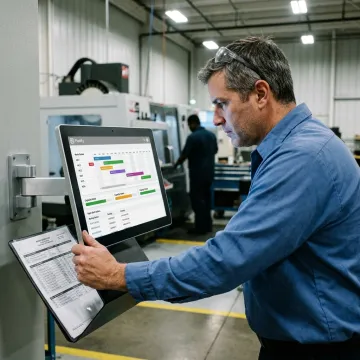
Planify is built for manufacturers that need schedules the floor can trust.
Planify models setups, shifts, dependencies, and disruptions as core scheduling realities.
The interface gives planners finite scheduling power with spreadsheet-style usability and faster adoption.
Run on Pretend before committing changes, so teams understand impact before production shifts.
ERP connector setup is included during onboarding, avoiding a separate integration project.
Manufacturing scheduling expertise behind every Planify implementation.

Scheduling Specialist
Dave has dedicated his career to assisting manufacturing companies in improving performance through strategic software solutions. He has had direct experience with many of the leading ERP and CAD/CAM providers.
Master scheduling turns demand, capacity, work orders, routings, and due dates into an executable production plan. In manufacturing, it helps determine what should run, when it should run, and which resources are required. Planify strengthens that process by respecting finite capacity, setup times, shifts, dependencies, and disruptions so the published schedule reflects real shop floor conditions.
Ask about your routings, ERP, constraints, or first scheduling run.

Browser-based scheduling access with no on-prem installation required.
ERP import and export supports practical production data flow.
Guided implementation helps manufacturers schedule faster.
Request a meeting to discuss your shop floor, ERP data, scheduling constraints, and the best way to see Planify run on your work orders.
To help us assist you faster, please include the reason for your message so the relevant team can reach out as soon as possible.
To help us assist you faster, please include the reason for your message so the relevant team can reach out as soon as possible.