This is the daily reality on most production floors, and it's exactly the problem sequence planning solves. Many manufacturers still lean on static schedules or spreadsheets that can't account for setups, job dependencies, or the disruption that shows up every single shift. The result: wasted machine time, blown deadlines, and planners who spend more time firefighting than planning.
This guide breaks down what sequence planning actually means, why it matters on the floor, the methods and tools people use to do it, a real-world example, and the common mistakes that derail even well-intentioned sequence plans.
Key Takeaways
- Sequencing sets job order; scheduling assigns time and resources to it
- Grouping jobs by shared tooling or setup cuts changeover time without added labor
- No single dispatching rule (FIFO, SPT, EDD) works for every shop condition
- Manual resequencing fails fast once disruptions and dependencies stack up
- Finite scheduling software re-sequences the board in seconds during disruptions
What Is Sequence Planning?
Sequence planning is the process of determining the optimal order in which jobs, operations, or tasks should run, based on dependencies, technical constraints, changeover requirements, and resource availability. It answers one question: what should happen next, and in what order?
That's different from scheduling, even though the two terms get used interchangeably. Sequencing sets the logical order of work; scheduling assigns specific start and end times plus resources to that order. One feeds directly into the other, but they're not the same decision.
| Term | What It Determines |
|---|---|
| Sequencing | The order in which work will be done |
| Scheduling | The start and finish times of each job |
The term also shifts meaning depending on context. In manufacturing, sequencing usually refers to production, job, or batch order on a specific machine or line.
In broader project management, a "sequence plan" often documents process flow and milestones across a project timeline, closer to a Gantt chart than a shop-floor dispatch list. This article focuses on the manufacturing use case.
A sequence plan pulls from several inputs:
- Work orders waiting to be processed, with quantities and specs
- Machine and tooling capacity at each work center
- Changeover or setup times between specific job pairings
- Due dates and customer commitments
- Priority rules set by the business (rush orders, key accounts, contractual penalties)
Sequence planning isn't a one-time exercise, either. Orders change, machines break, and shifts run short. A sequence plan has to be revisited constantly, not filed away once it's built.
Why Sequence Planning Matters on the Shop Floor
Poor sequencing shows up first in your changeover numbers. Setup and adjustment time counts directly against Overall Equipment Effectiveness (OEE), since that time could otherwise go toward production.
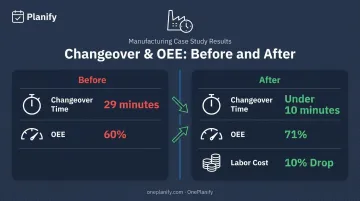
A 2022 case study of a chilled ready-meal factory found that cutting changeovers from 29 minutes to under 10 minutes pushed OEE from 60% to 71%, alongside a 10% drop in labor cost. That gain came from combined lean and sequencing changes, not sequencing alone, but it shows how much room typically sits inside changeover time.
Beyond OEE, sequencing affects three other areas directly:
- On-time delivery: poor sequencing creates dependency conflicts between jobs, work centers, and trades that delay downstream operations
- Labor and machine utilization: crews and equipment sit idle waiting on upstream tasks that were sequenced out of order
- Cash flow: expedite fees, rework, and rescheduling errors chip away at margin on jobs that were otherwise profitable
Dave Luckner, a Scheduling Specialist who has spent his career working alongside manufacturers on ERP and CAD/CAM implementations, puts it simply:
"Shop floors are messy. Setups run long, shifts change mid-run, and something always breaks. A sequence plan that doesn't account for that reality isn't a plan, it's a guess."
That "messy reality" is the whole point. A sequence built for an idealized floor, one with no setup drift and no shift limits, looks great on paper and falls apart by lunch.
Sequence Planning Methods, Techniques and Tools
Common Sequencing Rules
Most sequencing decisions come down to a handful of well-established dispatching rules. Each optimizes for something different, so the right choice depends on what's hurting most on your floor.
| Rule | What it does | Best used when |
|---|---|---|
| FIFO (First-In-First-Out) | Runs jobs in the order they arrived | Fairness or contractual arrival order matters most |
| SPT (Shortest Processing Time) | Runs the fastest job next | You need to minimize average flow time |
| EDD (Earliest Due Date) | Runs the job due soonest next | Minimizing the worst-case lateness matters most |
| Changeover-minimization | Groups jobs by tooling or setup similarity | Setup time is your biggest capacity loss |
No single rule wins every time. More than 100 dispatching rules have been catalogued over the decades, and performance shifts depending on shop conditions, meaning the "right" rule today might be the wrong one next week.
Visual and Analytical Tools
Gantt charts and precedence diagrams remain the go-to visual tools for sequence planning. Gantt charts show task order, duration, and overlap across work centers. Precedence diagrams map which operations must happen before others, useful when a job has multiple dependent steps.
Both work fine on paper, until the job count grows. Manual sequencing and spreadsheets hit a wall fast:
- No mechanism to model setup time that depends on job order (Job A to B might take 45 minutes; Job A to C, only 15)
- No way to enforce shift boundaries or dependency chains automatically
- Every disruption requires a manual rebuild, often dropping constraints in the process
The problem runs deeper than spreadsheets. Exact job-shop scheduling has been proven NP-complete for any shop with two or more machines, so there's no shortcut formula for finding the perfect sequence by hand once real-world variables pile up.
This is exactly the gap finite scheduling software fills. OnePlanify was built to handle this kind of complexity, letting planners manage setups, shift changes, dependencies, and disruption without needing a data science degree to run it.
The engine models sequence-dependent setup times and enforces real shift calendars per work center. When a machine goes down or a rush order lands, it re-sequences the entire board automatically — something no spreadsheet can do in real time.
Key Elements of an Effective Sequence Plan
A sequence plan is only as good as the constraints it respects, and three elements matter most:
- Dependencies and precedence relationships. A weld can't happen before a cut, and ignoring that precedence lock produces a plan that's mathematically tidy but physically impossible.
- Setup and changeover feasibility. The "best" sequence on paper may require a tooling change your floor can't support back-to-back, so technical constraints, not just time savings, decide what's actually feasible.
- Resource and shift alignment. A sequence that ignores who's on the floor, and when, isn't a real plan, since labor availability, overtime authorization, and equipment uptime all determine feasible job order.
Get these three right, and the sequence holds up under pressure. Miss one, and the plan looks good in the software but fails the moment it hits the floor.
Sequence Planning Example
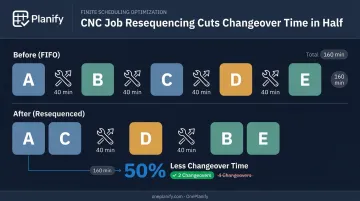
Picture a single CNC machine with five jobs queued up, each requiring different tooling and due at different times.
Before: running jobs in arrival order (FIFO)
| Job | Due Date | Tooling | Changeover from prior job |
|---|---|---|---|
| A | Day 3 | Tool Set 1 | — |
| B | Day 2 | Tool Set 3 | 45 min |
| C | Day 5 | Tool Set 1 | 40 min |
| D | Day 1 | Tool Set 2 | 35 min |
| E | Day 4 | Tool Set 3 | 40 min |
Running these in order of arrival forces four full tooling changes. Total changeover time: 160 minutes, and Job D, due first, runs dead last.
After: resequenced by tooling similarity
Grouping jobs A and C (Tool Set 1), then D (Tool Set 2), then B and E (Tool Set 3), cuts the tooling changes from four down to two.
This mirrors findings from a job-sequencing study on flexible manufacturing systems. Accounting for sequence-dependent setup time cut total setup time from 42 seconds to 23 seconds on a comparable job set, nearly a 45% reduction.
The takeaway: the work itself didn't change, only the sequence did. That's the value proposition of sequence planning: small resequencing decisions, made with the right logic, free up real production capacity without adding a single machine hour.
Common Challenges in Sequence Planning and How to Solve Them
Even planners who understand sequencing logic run into the same walls repeatedly.
Disruptions break manual plans fast. A breakdown, a rush order, or a shift-change gap forces constant rework. In a spreadsheet, that means manually re-checking every dependency and setup pairing, a process that eats hours and often misses something.
Beyond disruptions, competing priorities pull in different directions. Meeting due dates, minimizing setups, and staying within resource limits rarely point to the same sequence. Optimize for one, and you often sacrifice another.
This is where dedicated finite scheduling software earns its place. picks the sequence that actually works on the floor.
Frequently Asked Questions
What is sequence planning?
Sequence planning is the process of determining the optimal order for production jobs or tasks, based on dependencies, technical constraints, and available resources. It sets the "what comes next" before scheduling assigns exact times.
What is a sequence example?
A common example: five CNC jobs with different tooling needs, resequenced by tooling similarity instead of arrival order. Grouping similar jobs together can cut total changeover time nearly in half.
What's the difference between sequence planning and scheduling?
Sequencing determines the order of work. Scheduling assigns specific start and finish times, plus resources, to that order. Sequencing answers "what's next"; scheduling answers "when and with what."
What industries rely most on sequence planning?
Manufacturing, automotive assembly, process industries like food and chemicals, and construction all use sequencing heavily. Automotive mixed-model assembly and job shops with multi-operation routings are especially dependent on it.
What tools are commonly used for sequence planning?
Gantt charts and precedence diagrams handle visualization. Spreadsheets work for small job counts. Finite scheduling software, like OnePlanify, handles the setups, dependencies, and disruptions that spreadsheets can't scale to.
How often should a sequence plan be updated?
Continuously. Shop floor conditions change by the hour, new orders arrive, machines go down, shifts shift. A sequence plan reviewed only once a week is already out of date by Tuesday.