Introduction
Picture a shop floor with a full order book, three CNC machines, and five work orders that all need machine time this week. The schedule looks fine on paper. Then Monday morning arrives, and two jobs need the same machine at the same hour.
This is the reality for most job shops. Schedules built on the assumption of unlimited machines, operators, or materials fall apart fast. The result? Missed deadlines, expensive overtime, and operators stretched thin across too many priorities.
Nearly 1.9 million manufacturing positions in the US could go unfilled through 2033, according to a joint projection from the Manufacturing Institute and Deloitte. That's not an abstract labor market statistic. It's a scheduling constraint that shows up on your floor every day.
This guide breaks down what resource-constrained scheduling actually means, how it plays out in a real shop, and how manufacturers can start applying it without hiring a dedicated scheduling analyst.
Key Takeaways
- Resource-constrained scheduling builds schedules around actual machine, labor, and material capacity, not unlimited assumptions.
- It differs from time-constrained scheduling, which locks the deadline and adjusts resources to fit.
- Shop floors with bottleneck equipment or scarce certified operators benefit most from this approach.
- Real-time monitoring and quick replanning matter as much as the initial schedule build.
- Purpose-built finite scheduling software removes most of the manual complexity involved.
What Is Resource-Constrained Scheduling?
Resource-constrained scheduling (RCS) is the practice of building a production schedule around what your resources can actually deliver, not what you wish they could deliver. Instead of assigning every job its ideal start date, RCS asks a different question first: when does the machine, operator, or material actually become available?
Think of it as scheduling in reverse. A time-constrained plan starts with a fixed deadline and works backward, squeezing resources to hit that date no matter what. Resource-constrained scheduling flips this logic. The deadline moves if it has to. The resource limit doesn't.
This concept overlaps heavily with what project management professionals call resource leveling, a technique that adjusts start and finish dates to resolve resource conflicts, even if it shifts the critical path. In manufacturing, the two terms get used almost interchangeably. Resource leveling is the more formally defined term in project management standards, while resource-constrained scheduling tends to describe the shop-floor application of the same idea.
When to Use Resource-Constrained Scheduling on the Shop Floor
Not every production environment needs this approach. It becomes essential when you're dealing with:
- Limited machine or equipment capacity: only two CNC machines available to cover five simultaneous work orders, for example
- Skilled labor shortages: certified welders, calibrated inspectors, or operators qualified on a specific machine who can't be swapped in from another line
- Shared resources across work orders: multiple production lines competing for the same tooling, testing equipment, or specialist
- Flexible delivery timelines: situations where a customer date can shift slightly to protect equipment and operator health, rather than forcing overtime or a rushed changeover
If any of these sound familiar, you're already living with resource constraints. The question is whether your schedule acknowledges them.
A Real-World Example of Resource-Constrained Scheduling in Manufacturing
Here's what this looks like on an actual floor. A metal fabrication shop runs three production lines, but all three feed into a single heat-treatment furnace. On paper, each line has its own schedule and none of them appear to conflict.
In practice, all three lines need furnace time on Wednesday afternoon. Without a resource-constrained view, the planner would assign all three jobs to run in parallel: an impossible outcome, since there's only one furnace.
A planner using RCS handles this differently:
- Identify the constraint: the furnace, not the lines themselves, is the bottleneck.
- Sequence around availability: Line A's parts go in first, Line B's batch follows once the furnace clears, and Line C's job gets pushed to the next morning shift.
- Adjust downstream tasks: packaging and shipping dates for Line C shift by roughly half a day to match the new furnace slot.
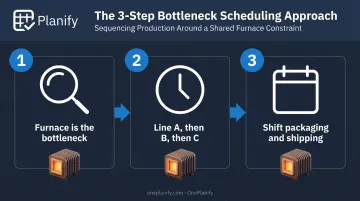
The outcome: no job runs through an unavailable furnace, no operator gets double-booked trying to babysit two batches at once, and quality doesn't suffer from a rushed cycle.
One delivery date moves slightly. That's the trade-off, and it's a far better one than a scorched batch or a burned-out operator running back and forth between three furnace loads.
This is what a resource-constrained schedule looks like in practice: tasks staggered around the resource that actually limits throughput, not just stacked onto a calendar that assumes everything can happen at once.
Resource-Constrained Scheduling vs. Resource Smoothing (Time-Constrained Scheduling)
Resource smoothing, often labeled time-constrained scheduling in older manufacturing literature, works from the opposite direction. The deadline stays fixed. The planner adjusts task sequencing using existing slack (float) in the schedule, without letting the finish date move.
The distinction matters because these two approaches solve different problems:
| Dimension | Resource-Constrained Scheduling | Resource Smoothing |
|---|---|---|
| Primary constraint | Resource availability (machines, labor, materials) | Fixed deadline |
| What moves | Task dates and sequencing | Nothing beyond available float |
| Critical path impact | May shift the critical path entirely | Should not affect the critical path |
| Timeline impact | Project or production finish date can extend | Finish date stays fixed |
| Best used when | Resources are scarce, timeline has flexibility | Deadline is fixed, resources have some slack |
Quick decision guide:
- Use resource-constrained scheduling when your bottleneck resource simply can't stretch further and the customer date has room to move.
- Use resource smoothing when the ship date is non-negotiable but you have enough slack time to rearrange tasks without adding resources.
- Use both when one part of the job has flexibility and another is locked to a customer date — schedule the flexible piece around resources, then smooth the fixed piece within its float.
This split often shows up within a single job. A prototype run with a flexible internal deadline gets scheduled around resource limits, while a contractual customer commitment downstream gets smoothed within existing float instead.
Benefits and Challenges of Resource-Constrained Scheduling
RCS isn't free. It solves real problems, but it introduces trade-offs planners need to manage deliberately.
The Benefits
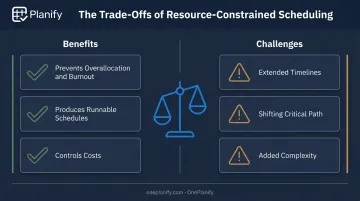
- Prevents overallocation and burnout. Building the schedule around actual capacity means no operator gets assigned to two machines at once. Fatigue research links long hours and inadequate recovery time to safety risks and reduced output.
- Produces schedules people can actually run. A plan built on real constraints won't collapse under a foreman's first look. NIST documented one shop, Stainless Works, that fixed its routings, targeted welding as the true bottleneck, and cut lead time from 12–14 weeks to 5 weeks.
- Controls costs. Fewer surprise overtime hours, less emergency outsourcing, and fewer rush equipment rentals. Canadian manufacturers reported nearly $7.2 billion in lost sales and penalties tied to labor shortages, according to a 2022 CME survey.
The Challenges
- Extended timelines. Tasks wait for the constrained resource to free up, which can push out production or project finish dates.
- A shifting critical path. Tasks that used to be low-priority can suddenly become the bottleneck once resources are reallocated, complicating coordination across shifts.
- Added complexity. Constraints change constantly. An absence, a machine breakdown, or a delayed material shipment can undo a schedule overnight, forcing planners back to the drawing board.
How to Implement Resource-Constrained Scheduling
Getting RCS working on your floor comes down to three ongoing steps, not a one-time setup.
- Assess actual resource availability first. Document real machine capacity (not nameplate capacity), certified operator counts by skill, shift patterns, and material lead times. Nominal and effective capacity rarely match once you factor in breakdowns, changeovers, and minor stops.
- Map dependencies and sequencing rules. Know which jobs can run in parallel and which must wait for a predecessor operation. Changeovers matter here too — grouping similar jobs together can shave hours off total setup time across a week.
- Monitor and adjust continuously. A schedule is a snapshot, not a guarantee. When a machine goes down or an operator calls in sick, the plan needs to shift tasks to the next available resource window immediately, not sit stale until someone notices the conflict.
Software like OnePlanify can automate this step, flagging conflicts and rerouting jobs to the next open resource window before the delay cascades through the week. Step three usually causes the most trouble: doing it fast enough that the schedule stays trustworthy after the first disruption of the week.
How OnePlanify Simplifies Resource-Constrained Scheduling for Manufacturers
This is exactly the gap OnePlanify was built to close. Most spreadsheets can't model dependencies at all, and most ERP scheduling modules assume infinite capacity, treating every machine and shift as always available. Neither reflects what actually happens on a shop floor.
Machine and labor constraints, handled automatically:
- Finite capacity scheduling that respects real machine limits, so two jobs never get double-booked on the same resource
- Sequence-dependent setup times — the system knows that Job A to Job B might take 45 minutes to change over, while Job A to Job C only takes 15
- Shift-aware calendars per work center, covering 1st, 2nd, and 3rd shifts, overtime rules, and holiday exceptions, so jobs never land on a shift that doesn't exist
Dependencies that survive disruption:
Multi-operation routing (think Op 10 → Op 20 → Op 30) gets enforced with predecessor locks. No downstream operation starts before its upstream step finishes, even after a full replan triggered by a machine breakdown or rush order. Planners can test scenarios in "Pretend" mode first, previewing which orders will slip before committing anything to the live schedule.
That combination is the point: manufacturers get comprehensive, constraint-aware scheduling without needing a scheduling PhD or a six-figure consulting engagement.
OnePlanify's onboarding runs alongside your existing ERP, and most customers are running their first real finite schedule within weeks, not quarters. It's finite scheduling that feels as simple as a spreadsheet, minus the manual re-planning every time something on the floor changes.
Frequently Asked Questions
What is resource-constrained scheduling?
It's the practice of building a production schedule around actual resource availability, such as labor, machines, and materials, instead of assuming unlimited capacity. Task timing adjusts to fit what's realistically available.
What is an example of a resource-constrained schedule?
Picture three production lines sharing one heat-treatment furnace. Rather than running all three at once, the planner staggers them based on furnace availability. One delivery date shifts slightly to avoid overloading the equipment.
What's the difference between resource-constrained and time-constrained scheduling?
Resource-constrained scheduling lets the timeline shift to match resource availability. Time-constrained scheduling keeps the deadline fixed and instead adjusts how resources get allocated within existing slack.
Is resource-constrained scheduling the same as resource leveling?
The two terms are commonly used interchangeably. Both aim to prevent overallocating machines or labor by adjusting the schedule. Resource leveling is simply the more formally defined term in project management standards.
How does resource-constrained scheduling affect the critical path?
Rescheduling around resource availability can move the critical path entirely. Tasks that weren't urgent before can suddenly become bottlenecks once resources get reallocated.
What tools help with resource-constrained scheduling?
Finite scheduling software, like OnePlanify, automates constraint-aware scheduling by factoring in machine capacity, shift calendars, and job dependencies. This cuts down the manual effort of using spreadsheets or generic project management tools.