Finite Scheduling
Create forward or backward schedules that respect real capacity, operation times, priorities, setups, and dependencies so planners publish work the shop floor can actually run.

Planify by OnePlanify brings comprehensive finite scheduling into a browser-based workspace your planners can trust. Manage shop floor capacity, setups, shifts, dependencies, ERP work orders, and rush-order disruption without wrestling with spreadsheets or infinite-capacity ERP modules. Built for manufacturers that need control, visibility, and fast replanning when production reality changes on the floor each day.
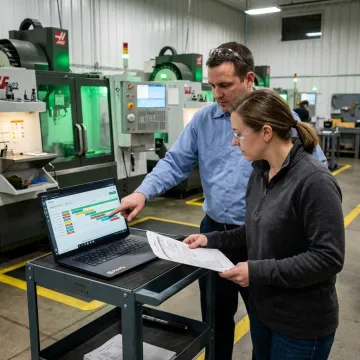
Planify covers finite scheduling, replanning, routing, shifts, changeovers, and ERP connectivity for complex manufacturing floors.
Create forward or backward schedules that respect real capacity, operation times, priorities, setups, and dependencies so planners publish work the shop floor can actually run.
Model rush orders, machine downtime, and schedule disruptions before committing changes. Pretend mode shows downstream impact so planners can choose the least damaging response.
Place jobs inside actual work-center calendars with overtime rules, holidays, closures, exceptions, and workforce availability built into the schedule from the start.
Model sequence-dependent setup and changeover times between jobs, group compatible work, and reduce hidden capacity loss across machine shops, press shops, and complex operations.
Enforce multi-operation routings and parent-child work order dependencies so downstream operations never start before the required upstream work is complete.
Pull work orders, routings, and work-center data from your ERP, then dispatch sequenced operations back to the floor without replacing core systems.
Planify turns your live production constraints into a schedule that mirrors the floor instead of an idealized spreadsheet. It accounts for setup, run, teardown, move times, shift calendars, routing dependencies, and ERP work orders, then lets planners replan in seconds when orders change. The result is clearer commitments, fewer surprises, and a control system foremen can actually follow.

OnePlanify helps manufacturers replace fragile spreadsheets with scheduling logic built for real production constraints.
Planify respects finite capacity, setups, shifts, dependencies, and disruption in one scheduling workspace.
Planners get comprehensive finite scheduling with a familiar, spreadsheet-like working experience.
Pretend mode lets teams model disruption impacts before committing changes to the active schedule.
OnePlanify helps connect production data and run your first finite schedule during onboarding.
Manufacturing scheduling expertise behind the Planify platform.

Scheduling Specialist
Dave has dedicated his career to assisting manufacturing companies in improving performance through strategic software solutions. He has had direct experience with many of the leading ERP and CAD/CAM providers.
The shopfloor, or shop floor, is the area where production work physically happens. In manufacturing, it includes machines, work centers, operators, material flow, work orders, inspections, and supervisors managing daily execution. Shop floor management software helps connect planning decisions to this real production environment by accounting for capacity, shifts, setups, routings, and disruptions.
Get practical answers from a manufacturing scheduling specialist.

Built specifically for complex manufacturing floors.
Runs in the browser without on-prem installation.
Connects scheduling workflows with ERP production data.
Request a meeting to review your floor, work orders, constraints, and scheduling goals with the Planify team.
To help us assist you faster, please include the reason for your message so the relevant team can reach out as soon as possible.
To help us assist you faster, please include the reason for your message so the relevant team can reach out as soon as possible.