Scheduling looks simple from the outside. Just fill in a calendar, right? In practice, results vary wildly depending on your inputs, your sequencing logic, and how well the plan handles the disruption that shows up every single shift.
Consider what's possible when scheduling is done well: a 2025 NIST Manufacturing Extension Partnership engagement helped Stainless Works cut lead times from 12-14 weeks down to 5 weeks, while adding $250,000 in retained sales and $50,000 in savings.
This guide walks through the exact steps to plan a shop schedule, the variables that make or break it, the mistakes that trip up even experienced planners, and the point where spreadsheets stop being enough.
Key Takeaways
- A solid schedule balances job priorities, machine/labor capacity, and setup times, not just dates
- Accurate inputs and dependency data matter more than the tool you use
- Spreadsheets work for simple, low-SKU shops but crack under setups, shift changes, and disruptions
- Buffer time and clear reprioritization keep a schedule intact past day one
How to Plan Your Shop Schedule: Step-by-Step
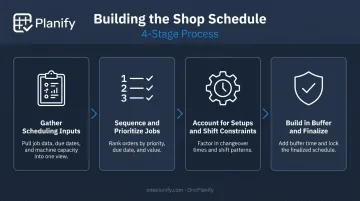
Building a workable schedule follows a logical sequence. Skip a step, and the plan you publish won't survive first contact with the floor.
Step 1: Gather Your Scheduling Inputs
Before you sequence a single job, collect the raw data:
- Collect open job orders, due dates, and the required operations or routings for each one
- Verify current machine, workstation, and labor capacity, including planned downtime or maintenance windows
- Confirm bills of materials, tooling, and raw materials are on hand
Skipping this step is where most schedules fail before they're even built. A job placed on the board without verified materials or tooling is little more than a guess.
Step 2: Sequence and Prioritize Jobs
Rank jobs using whatever rule fits your shop: due date, customer priority, or contribution margin. Then look for grouping opportunities.
Jobs with similar tooling or material setups should sit next to each other where possible, since this cuts changeovers between dissimilar jobs.
Before locking that sequence, check operation dependencies. A part that needs machining before it moves to assembly can't be scheduled out of order, no matter how convenient the sequence looks on paper.
Step 3: Account for Setups, Shift Patterns, and Constraints
This is where schedules built on optimism instead of data tend to collapse. Setup and changeover time between jobs counts as real production time that eats into your schedule if ignored.
- Map every job against actual shift patterns: part-time labor, breaks, and skill-specific assignments included
- Flag jobs that depend on a single bottleneck machine or a specialized operator
- Don't assume back-to-back scheduling; build the changeover into the timeline itself
Step 4: Build in Buffer and Finalize
Add buffer time around your highest-risk operations so a minor delay doesn't cascade through the whole plan. Publish the schedule in a format the floor can act on immediately, and confirm supervisors see the changes, not just the original version.
Finally, set a cadence for review. Daily or shift-based check-ins catch new orders and disruptions before they become full-blown problems. Scheduling software like OnePlanify can automate this replanning, flagging conflicts the moment a rush order or machine outage hits the floor.
Key Factors That Affect Your Shop Schedule
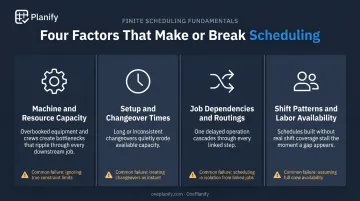
Schedule accuracy depends less on which tool you use and more on how well these four variables get tracked and updated.
Machine and Resource Capacity
Overbooking a resource creates a bottleneck that cascades through every downstream job. Once a bottleneck forms, downstream stations starve for work while limited upstream buffers cause blocking and inventory buildup elsewhere, a chain reaction familiar to anyone who's managed a shop floor.
Accurate capacity data prevents:
- Unplanned overtime scrambling to cover gaps
- Missed delivery dates
- Idle machines while another station drowns in backlog
Setup and Changeover Times
Ignoring changeover time is one of the most common causes of schedule slippage. Grouping similar setups can meaningfully reduce total changeover across a shift, but it's not a universal fix.
The 2015 Top Shops benchmark found leading shops actually reported longer median setup times (90 minutes) than other shops (68 minutes), largely because they were running more complex, higher-margin parts. The lesson: optimize for setup reduction and due dates together, not setup time in isolation.
Job Dependencies and Routings
Multi-step jobs require upstream operations to finish before downstream ones can start. Miss a dependency, and you get idle downstream stations, rework, and a schedule that looks fine on paper but falls apart on the floor.
The Stainless Works case above didn't get usable lead times until routings were corrected and work centers were properly configured. Bad routing data made every schedule built on top of it unreliable.
Shift Patterns and Labor Availability
A schedule that ignores who's actually working which shift isn't executable, full stop. Matching skill-specific tasks to available operators reduces errors and rework downstream.
Labor availability is more volatile than most planners assume. A 2021 Workforce Institute at UKG survey of 300+ manufacturing decision-makers found 13% were adjusting labor schedules daily because of unplanned absences, and half reported call-outs with less than 24 hours' notice several times a month.
Common Mistakes When Planning a Shop Schedule
Most scheduling failures aren't dramatic. They're small, repeated oversights that compound over weeks.
- Treating the schedule as a one-time task. A shop schedule needs daily or shift-level updates, not a one-and-done build at the start of the week.
- Ignoring setup and changeover time. Sequencing similar or dissimilar jobs back-to-back without accounting for changeover guarantees the plan drifts within hours.
- Missing dependencies between operations. When downstream work isn't flagged against upstream completion, jobs sit idle at the handoff point, and nobody notices until it's late.
- Skipping buffer time. Machine breakdowns, late materials, and absenteeism are weekly occurrences, not edge cases, and a schedule without room for them fails on day one.
Machine failure, rush orders, quality problems, and operator absenteeism are the most common disruption triggers on manufacturing floors. None of these are rare. A schedule that can't absorb at least one of them isn't a real schedule.
When Spreadsheets and Manual Scheduling Break Down
Whiteboards and spreadsheets work fine when job counts are low and dependencies are simple. The trouble starts once job count, sequence complexity, and shift variation grow past what one person can track by hand.
| Method | Strength | Where It Breaks |
|---|---|---|
| Whiteboard/manual | Fast to start, no learning curve | Nearly impossible to reschedule quickly when a machine goes down or a rush order lands |
| Spreadsheet | Good for tracking raw data | Requires manual recalculation every time priorities shift, raising the error risk |
| Finite scheduling software | Built for setups, shifts, dependencies, and disruption | Requires a data setup step, though this has gotten much faster |
Spreadsheets struggle most with recalculation. A spreadsheet has no mechanism to dynamically apply sequence-dependent changeover costs across a whole production board. That's why a schedule that looks 85% utilized on paper often runs at closer to 60% in reality once changeover time actually gets accounted for.
This is the gap finite scheduling software like OnePlanify's Planify platform is built to close. Instead of a static grid, it models setup, run, teardown, and move times per operation. It groups compatible work orders to minimize re-tooling and enforces routing dependencies (Op 10 must finish before Op 20 starts), even after a disruption.
When a machine breaks down or a rush order hits mid-shift, Planify can resequence the entire board in seconds. Its "Pretend mode" lets a planner test a few different responses and see exactly which orders slip and by how much.
The planner can then commit to the least damaging option without dropping a single shift rule or dependency. That's the practical difference between a tool for storing data and one built to actually schedule around it.
Conclusion
A strong shop schedule comes from accurate inputs, realistic sequencing, and enough room for disruption. It's never just about filling time slots on a calendar.
Trace almost any scheduling failure back far enough, and you'll find skipped preparation or an ignored constraint, usually setups or dependencies nobody flagged in time.
If your current method feels like it's held together with tape, take that as a signal. Ask whether your scheduling process still scales with how complex your shop has become, and consider whether purpose-built finite scheduling software, like OnePlanify, could close the gap.
Frequently Asked Questions
What is an order schedule?
An order schedule is the planned sequence and timing of production or repair orders across available resources. It shows when each job starts, moves through operations, and completes.
What is finite scheduling in manufacturing?
Finite scheduling accounts for real, limited capacity, meaning actual machines, labor, and tooling, rather than assuming unlimited resources. The result is a schedule that's genuinely achievable on the floor.
How often should I update my shop schedule?
Review and adjust it daily or per shift. New orders, delays, and absenteeism can make a static schedule outdated within hours.
Can I plan a shop schedule using Excel or a spreadsheet?
Yes, for smaller shops with few jobs and simple dependencies, a spreadsheet can work. Manual recalculation becomes a bottleneck as job count and complexity grow.
What's the difference between capacity planning and shop scheduling?
Capacity planning estimates overall resource availability over time. Shop scheduling assigns specific jobs to specific resources and time slots within that available capacity.
How do I handle schedule disruptions like machine breakdowns or absenteeism?
Build buffer time into the schedule around high-risk operations and have a clear process for quickly re-sequencing affected jobs. That way one disruption doesn't derail the entire plan.