Finite Scheduling
Build a finite production schedule that respects real capacity, setup, run, teardown, move time, priorities, work centers, and due dates in a browser-based workspace.

Planify by OnePlanify turns complex shop-floor scheduling into a clear, visual planning board your team can trust. See capacity, shifts, setups, dependencies, and disruption impacts in one browser-based workspace—without replacing your ERP or wrestling with spreadsheets. Built for manufacturers who need a practical finite schedule that matches how production actually runs.
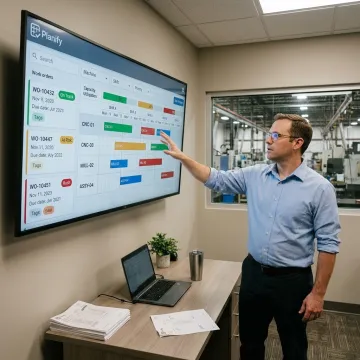
Visual production scheduling tools for capacity, constraints, ERP data, disruptions, and shop-floor execution.
Build a finite production schedule that respects real capacity, setup, run, teardown, move time, priorities, work centers, and due dates in a browser-based workspace.
Model rush orders, machine breakdowns, and disruptions before committing changes, then replan the full board in seconds while preserving critical constraints.
Place jobs inside real shift calendars, including overtime rules, holiday exceptions, weekend closures, workforce availability, and first, second, or third shift operations.
Account for sequence-dependent setup times and group compatible jobs so machines spend more time producing and less time being re-tooled between orders.
Schedule multi-operation routings and parent-child work orders so downstream operations never begin before required upstream work is completed.
Connect ERP work orders, routings, and work-center data to Planify without replacing your core ERP or launching a separate IT project.
Visual Planning with Planify gives planners a practical way to see the whole production picture before decisions hit the floor. Capacity, shifts, setups, routings, dependencies, and disruptions are modeled together, so the schedule is not just attractive on screen—it is executable. Your ERP remains the system of record while Planify becomes the visual scheduling layer operators can trust.
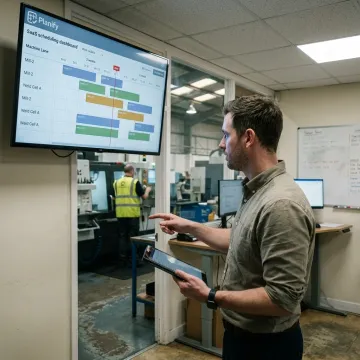
OnePlanify helps manufacturers move from fragile spreadsheets to schedules the floor can actually run.
Planify makes comprehensive finite scheduling feel familiar, visual, and spreadsheet-simple for planners.
Built for real shop-floor constraints like setups, shifts, dependencies, routing, and disruption.
Runs alongside your ERP, pulling scheduling data without requiring a rip-and-replace project.
Small-batch onboarding helps teams connect data and build their first real schedule faster.
Manufacturing scheduling expertise behind every Planify implementation.

Scheduling Specialist
Dave has dedicated his career to assisting manufacturing companies in improving performance through strategic software solutions. He has had direct experience with many of the leading ERP and CAD/CAM providers.
Visual Planning with Planify gives manufacturers a browser-based scheduling board that shows work orders, capacity, shifts, setups, dependencies, and disruption impacts in one place. Instead of manually updating spreadsheets or relying on infinite-capacity ERP logic, planners can build a finite schedule that reflects real shop-floor limits and is easier for foremen to trust.
Talk with a scheduling specialist about your production constraints.

Built for real shop-floor scheduling complexity.
Browser-based access without on-prem installation.
Guided setup for practical production scheduling.
Request a meeting to discuss your shop-floor constraints, ERP data, scheduling goals, and the best path to your first finite schedule.
To help us assist you faster, please include the reason for your message so the relevant team can reach out as soon as possible.
To help us assist you faster, please include the reason for your message so the relevant team can reach out as soon as possible.