Introduction
Shutdown and turnaround scheduling is the process of sequencing every maintenance, inspection, and project task for a planned plant outage into a single, resource-constrained timetable so the plant restarts safely and on time.
This matters most to maintenance planners, reliability engineers, and plant managers in refining, chemical, power, and heavy industrial operations. Get it wrong, and you're not just late. You're burning budget, risking safety incidents, and delaying revenue-generating uptime.
Much of that risk starts with confused terminology. On the floor, "shutdown" and "turnaround" get used interchangeably, and so do "schedule" and "work list." They're not the same thing. A static Gantt chart isn't a live plan, and a master schedule isn't a task list waiting to be sequenced.
This article breaks down what the process actually is, why it exists, how it works step-by-step, what factors determine success, and where teams commonly get it wrong.
Key Takeaways
- Scheduling sequences thousands of tasks into one resource-constrained timetable
- It follows a flow: work list → logic network → critical path → resource leveling → daily tracking
- Contractor availability, parts lead time, and permit rules determine whether the plan holds up
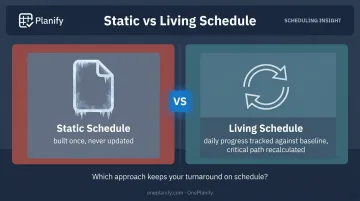
- Most failures come from treating the schedule as a finished document instead of a living plan
What Is Shutdown and Turnaround Scheduling?
Shutdown and turnaround scheduling takes all approved outage work and organizes it into a logic network, complete with durations, dependencies, and resource assignments. The goal: calculate the shortest safe outage duration possible.
In practice, it finds the fastest path from "shutdown" to "safe restart" without breaking safety rules, quality standards, or resource limits.
Scheduling isn't the same as turnaround planning. Planning happens first, defining the scope: what work gets approved, what parts get ordered, and what the work list actually contains.
Scheduling builds on that approved scope, answering the "when" and "in what order," not the "what."
Shutdown vs. Turnaround: What's the Actual Difference?
The terms get used loosely, but there's a practical distinction most plants follow:
| Aspect | Shutdown | Turnaround |
|---|---|---|
| Scope | Single unit or system | Whole plant, all units |
| Duration | Hours to a few days | Weeks to months |
| Work type | Routine maintenance stoppage | Maintenance, inspection, and capital work |
The American Fuel & Petrochemical Manufacturers association defines a turnaround as a planned period of extensive maintenance, renovation, and capital investment. Timelines can range from weeks to months, with complex programs exceeding a million man-hours.
Scheduling for either one is usually run as a Critical Path Method (CPM) network. AACE International, the cost engineering standards body, describes CPM as applying logic to sequence activities into a network and mathematically determining timing. The critical path is the longest logical chain, setting the shortest possible completion date. Most teams build and track this in tools like Oracle Primavera P6 or Microsoft Project.
Why Shutdown and Turnaround Scheduling Matters
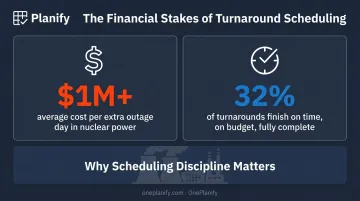
The financial stakes here are not abstract. In the nuclear power sector, an extra day of outage can easily cost an operator more than $1 million, driven by ongoing contractor and equipment costs plus lost generation.
That figure is sector-specific, but the underlying math (idle costs plus lost production) applies across process manufacturing.
And most turnarounds don't hit their targets. Boston Consulting Group reports that, at best, only about 32% of turnaround events finish on time, on budget, with all planned tasks completed.
What Scheduling Actually Coordinates
A single turnaround might involve hundreds or thousands of interdependent tasks spread across multiple trades and contractors. Scheduling exists to make sure:
- Equipment, cranes, and crews are never double-booked
- Hazardous work fronts don't overlap without a joint safety review
- Contractors aren't sitting idle waiting on predecessor tasks
- Scope added after the cutoff date doesn't quietly derail the whole plan
Without that discipline, you get schedule slippage, idle crews burning day-rate contracts, and safety incidents from overlapping hazardous jobs. This isn't hypothetical.
Industry guidance from AIChE's Center for Chemical Process Safety flags turnarounds as the point where simultaneous operations, or SIMOPS, are most likely to occur. That's exactly why joint hazard reviews and coordinated sequencing matter so much during these windows.
Scheduling triggers vary by facility, whether that's a fixed calendar interval, equipment condition, or a regulatory inspection deadline like pressure vessel or boiler testing. Most of the discipline itself, though, is operationally driven best practice, not a legal mandate.
Here's the part that gets missed: even outside heavy-outage industries, a planned shutdown forces the rest of the plant's production orders to be replanned around that downtime window. Shift plans, job sequences, and downstream dependencies all shift too.
That's a finite scheduling problem, and it's where a tool like OnePlanify comes in, re-sequencing jobs and shifts around a planned downtime window without losing track of the shop floor's complexity.
How Shutdown and Turnaround Scheduling Works (Conceptual Flow)
At a high level, the process moves from an approved work list to an executed, tracked master schedule. The inputs include approved work orders, task duration estimates, crew and resource requirements, safety and permit constraints, and material lead times.
Logical dependencies, most commonly finish-to-start or start-to-start relationships, link those inputs into a network. Calculating that network reveals the critical path and total duration. From there, resource leveling, crew sequencing, and a firm cutoff date keep the plan grounded in reality.
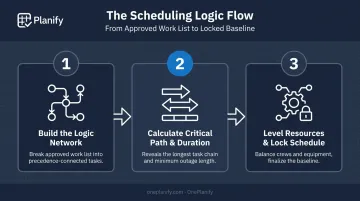
Step 1: Build the Logic Network
Planners break the approved work list into discrete tasks, each connected by precedence relationships. This creates a logic diagram showing exactly how work has to flow, from isolation through completion, before the next task can start.
Step 2: Calculate the Critical Path and Duration
Scheduling software runs a forward and backward pass through the network to find the critical path: the longest chain of dependent tasks. This sets the minimum possible outage duration. The software also flags near-critical paths, those with very little slack, as risk areas, since a small delay there can create a new critical path.
Step 3: Level Resources and Lock the Schedule
Planners balance crews, contractors, and shared equipment (cranes, scaffolding, rigging) across the timeline to eliminate conflicts. Once that's done, the team finalizes the schedule ahead of the cutoff date. It becomes the baseline for daily execution tracking, the fixed reference point planners use to measure every future update.
Key Factors That Affect Shutdown and Turnaround Scheduling
Several variables determine whether a schedule holds up once execution starts:
- Duration estimate accuracy: small errors compound fast across thousands of linked activities, pushing the critical path further out with each miscalculation
- Contractor and crew availability: trade mix and crew count limits directly cap how much work can run in parallel
- Spare parts and material lead times: a part that's two weeks late can stall an otherwise-ready task indefinitely
- Shared equipment dependencies: a single crane or scaffolding crew serving multiple work fronts creates a bottleneck the schedule has to account for
- Safety and permit constraints: LOTO, hot work, and confined space rules gate exactly when a task is allowed to start, not just how long it takes
- Scope size and complexity: the more tasks involved, the faster manual scheduling methods break down and the more essential true CPM logic becomes
Common Issues, Misconceptions, and When It May Not Be Necessary
The biggest misconception: the schedule is "done" once it's built. In reality, a baseline schedule is only the approved comparison plan, and it has to be continuously updated as actual progress gets tracked against it. Skip that step, and you're flying on outdated information within days.
A close second: manually adjusting a spreadsheet or basic Gantt chart instead of running true CPM calculations. That approach misses how a single delayed task ripples across thousands of linked activities downstream. The result resembles a schedule, but it can't reveal how far the real critical path has slipped.
There's also a common mix-up between the schedule itself and schedule compliance:
| Concept | What it measures |
|---|---|
| The schedule | The plan: task sequence, durations, dependencies, critical path |
| Schedule compliance | Whether work is actually happening on the dates the plan says it should |
A perfectly built schedule with no compliance tracking still fails. High task-completion percentages can hide a critical path that's already slipping.
Not every shutdown needs this level of rigor, though. Skip full CPM scheduling when a shutdown meets all of the following:
- Runs a single day or less
- Involves only a handful of interdependent tasks
- Carries low complexity, with little risk to the critical path
A simple checklist often serves these situations better than a full logic network built in Primavera or MS Project.
The takeaway: scheduling discipline determines whether a turnaround finishes on time, more than the software running it. The tool only works if the process behind it, meaning an accurate work list, a disciplined cutoff, and daily tracking, is actually followed.
Frequently Asked Questions
What is turnaround time scheduling?
Turnaround scheduling sequences every approved maintenance and project task for a planned outage into a single critical-path timetable. That schedule determines the shortest safe restart date given resource and safety constraints.
What's the difference between a shutdown and a turnaround?
Shutdowns are shorter, unit-level stoppages, often lasting under 24 hours. Turnarounds are major, multi-week, whole-plant events that combine maintenance, inspection, and capital work.
How long does it take to plan a plant turnaround?
Major turnarounds typically need 12-24 months of lead time for scope definition, planning, and scheduling. Smaller shutdowns may only require a few months of prep.
What software is used for shutdown and turnaround scheduling?
Oracle Primavera P6 and Microsoft Project are the most commonly referenced tools for critical-path scheduling. Both handle the planning side well but aren't built for tracking real-time execution on a live shop floor.
Who is responsible for building the turnaround schedule?
A dedicated Turnaround Manager or scheduler typically owns the master schedule, supported by planners and department leads who provide task-level detail and resource input.
How does shutdown scheduling affect ongoing production planning?
Production orders and shift plans across the rest of the plant need to be re-sequenced around the outage window. That's where finite scheduling tools like OnePlanify help teams replan the shop floor without losing track of dependencies and disruptions.