Introduction
Most shop floors aren't running one job at a time. They're juggling dozens of orders across multiple machines, each with its own due date, tooling requirements, and material needs.
Here's what a lot of planners miss: sequence matters just as much as timing.
Run the same five jobs in a different order, and you can add hours of changeover time, blow past a due date, or leave a machine sitting idle waiting on the next setup. The schedule looked fine on paper. The floor tells a different story.
This article breaks down what order sequencing actually means and the rules manufacturers use to decide job order. It also covers how modern scheduling tools take the guesswork out of a problem that gets harder every time you add a job, a machine, or a shift.
Key Takeaways
- Order sequencing sets the exact run order on a machine, not when work happens
- Common rules include First Come First Served, Shortest Processing Time, Earliest Due Date, and setup/changeover grouping
- Spreadsheets and whiteboards work at low volume, but break down fast once setups and disruptions pile up
- Finite scheduling software re-sequences orders automatically the moment shop floor conditions change
What Is Order Sequencing in Manufacturing?
Order sequencing is the process of deciding the specific order in which production orders, jobs, or operations run on a given machine or work center. The goal: hit delivery targets while wasting as little time and capacity as possible.
Sequencing is a downstream decision. A schedule tells you what needs to happen and by when. Sequencing decides the exact execution order on each individual resource once that schedule exists.
Here's a simple example that makes this concrete. Say three jobs (X, Y, and Z) are all due this week. Job X and Job Z use the same tooling setup, while Job Y requires a completely different configuration.
Run them in the order X → Y → Z, and you pay for two full changeovers. Run them X → Z → Y instead, and you only pay for one.
Same three jobs. Same due dates. Different total time on the floor just because of sequence.
Why Sequence, Not Just Schedule, Matters
Poor sequencing is often invisible on paper. The schedule shows every job assigned to a machine, every date filled in, everything looking clean. Then production starts, and the cracks show up as:
- Late jobs that "should" have finished on time
- Extra changeovers eating into run time
- Overtime that wasn't in the original plan
- Machines sitting idle between poorly ordered jobs
Setup and changeover time is where a lot of this hidden cost lives. A 2023 case study on automotive headlamp assembly found that reducing changeover time from 489.7 seconds to 198.3 seconds pushed effective machine utilization from 63.4% up to 84.7%, freeing up enough time to run six additional lamp assemblies per changeover cycle (Niekurzak et al., 2023).
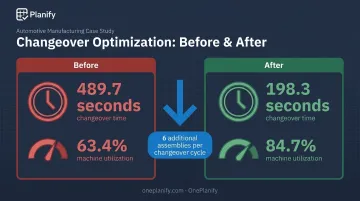
That's one operation, one case. But it illustrates a pattern that shows up across shop floors everywhere: get the sequence wrong, and setup time eats capacity that never shows up as a line item anywhere.
Real shop floors complicate things further. Tooling changes, shift patterns, material availability, and dependencies between upstream and downstream operations all layer on top of the basic sequencing question. That's a lot to juggle by hand.
Ordering, Sequencing, and Scheduling: What's the Difference?
These three terms get used interchangeably on the floor, but they solve different problems.
- Ordering refers to how jobs enter the system: the order in which purchase orders or work orders are created or received
- Sequencing decides the actual order those jobs get executed on a specific machine or work center
- Scheduling assigns resources, dates, and durations to each job across the whole operation
Scheduling and sequencing work together, but neither replaces the other. Scheduling answers "what runs where and when." Sequencing answers "in what order, on this specific resource." A production schedule can be published and still fall apart if the sequence within it ignores setup realities.
A concrete example: Work orders A, B, and C move through the system in this order:
- Work orders A, B, and C enter the system in that order, straightforward and chronological — that's ordering.
- The scheduler assigns all three jobs to the same CNC machine this week — that's scheduling.
- Instead of running A, B, C as received, the planner sequences B first because it shares tooling with A, then runs A, then C — that's sequencing.
Same three jobs, same due dates. Grouping by setup similarity saves a changeover that running strictly in received order would have required.
This is the gap a lot of manual planning misses. Jobs get worked in the order they showed up, not the order that minimizes wasted time.
Common Order Sequencing Rules Used on the Shop Floor
Most manufacturers lean on one or a mix of a handful of proven sequencing rules. None of them is universally "best" — each optimizes for something different.
First Come, First Served (FCFS)
Jobs run strictly in the order they arrive. It's simple, transparent, and feels fair to customers and floor staff alike. The tradeoff: FCFS ignores setup similarity and urgency entirely, so it's often the least efficient rule when changeovers or due dates are tight.
Shortest Processing Time (SPT)
Running the quickest jobs first gets more orders moving through the floor sooner. Academic scheduling models show SPT minimizes average flow time across a set of jobs on a single machine (Bilkent University, IE375). The downside: long jobs can get pushed back repeatedly if shorter work keeps jumping the queue.
Earliest Due Date (EDD)
Sequencing by due date is the go-to rule when on-time delivery is the top priority. The same scheduling research shows EDD minimizes maximum lateness in simplified single-machine models. That result assumes no setup times and uninterrupted machine availability, conditions that rarely hold on a real floor.
Setup/Changeover-Based Sequencing
This approach groups jobs with similar tooling, materials, or specifications to minimize changeover and cleaning time between runs. Setup time in manufacturing is often sequence-dependent: how long a changeover takes depends on which job ran immediately before it, not just which job is coming up (Ying, Pourhejazy & Lin, 2025).
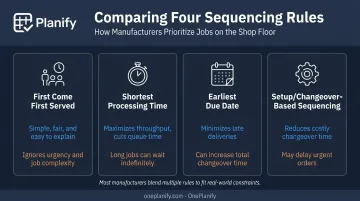
In practice, most manufacturers blend these rules rather than committing to just one:
- EDD for jobs approaching their due date
- Setup grouping for jobs with flexible timing
- Dependencies between operations that override any single rule when one job can't start until another finishes
No single rule wins in every situation. That's exactly why manual sequencing gets so difficult once real constraints pile up.
Why Manual Order Sequencing Breaks Down
Spreadsheets and whiteboards work fine when you're sequencing five jobs across two machines. They fall apart once job counts, machines, and constraints multiply.
Here's the math problem hiding underneath: the number of possible sequence combinations grows factorially with job count. Ten jobs on one machine means over 3.6 million possible orderings. No planner is manually testing which combination minimizes changeovers while also respecting due dates and shift boundaries.
Disruptions make it worse. Common triggers include:
- Machine breakdowns halt a job mid-run
- Rush orders land and demand a new spot in the queue
- Material shipments arrive a day later than planned
Any one of these forces a re-sequence — and doing that by hand means reworking the whole plan, fast, usually under pressure.
Disruptions aren't rare events either. Fluke's 2025 industry report found:
- 55% of US manufacturers experienced unplanned downtime in the past year
- Nearly half reported 6 to 10 incidents per week, and another 19% reported 11 to 20
- Unplanned downtime costs the sector as much as $207 million in lost capacity per week
Every one of those incidents can invalidate whatever sequence was planned that morning. A whiteboard doesn't re-optimize itself. A spreadsheet doesn't know that Job B now needs to jump ahead of Job A because the machine that was running Job A just went down.
This is the point where manual sequencing methods stop being a minor inconvenience and start costing real money.
How Finite Scheduling Software Simplifies Order Sequencing
Purpose-built finite scheduling software applies sequencing logic automatically and continuously — factoring in setups, shift patterns, dependencies, and current shop floor status without a planner manually testing combinations.
Here's what that looks like in practice:
- Sequence-dependent setup modeling. Switching Job A to Job B might take 45 minutes versus 15 minutes for Job A to Job C. The system groups compatible jobs automatically, rather than applying one flat setup time to everything.
- Shift-aware sequencing. Jobs are placed only within real, staffed shift windows, accounting for weekend closures, holidays, and overtime authorization, so the published sequence is one the floor can actually run.
- Dependency enforcement. No downstream operation gets sequenced ahead of its upstream predecessor, even across departments or parent/child work orders, and that rule holds through every replan.
OnePlanify is one example of a finite scheduling platform built around this exact problem: the messy, real-world complexity of shop floors, not the idealized version that lives in a textbook. It's designed to model setups, shift changes, and operation dependencies while staying as approachable as a spreadsheet to actually use day-to-day.
When disruption hits (a rush order, a machine going down), the platform can run a full-board resequence in seconds. A "pretend mode" lets planners preview the downstream impact of a potential change (which orders slip, and by how much) before committing to it, rather than discovering the fallout after the fact.
Dave Luckner, OnePlanify's Scheduling Specialist, sees this pattern repeatedly across manufacturing clients. Spreadsheets simply can't model setup dependencies or sequence-based changeover logic, so planned utilization rarely survives contact with the shop floor.
A schedule that looks 85% utilized on paper often runs closer to 60% in reality once changeover time gets ignored in the planning stage. — Dave Luckner, Scheduling Specialist, OnePlanify
As order volume and job complexity grow, that gap between the planned schedule and the achievable one only widens. Moving from manual sequencing to automated finite scheduling tends to be the deciding factor in whether delivery targets get hit consistently or slip a little more each month.
Frequently Asked Questions
What is the difference between ordering and sequencing?
Ordering refers to how jobs enter the system, typically in the order they're created or received. Sequencing determines the actual order those jobs run on the shop floor, which can differ from arrival order.
What are the 4 types of sequences?
The four common manufacturing sequencing approaches are First Come First Served, Shortest Processing Time, Earliest Due Date, and setup/changeover-based sequencing. Most manufacturers blend two or more depending on floor conditions.
What is an example of order and sequence?
Work orders might be received in the order A, B, C, but a scheduler resequences them to B, A, C because B shares tooling with A. This setup-similarity grouping reduces total changeover time without changing due dates.
What is the difference between order sequencing and production scheduling?
Scheduling assigns resources, dates, and durations to jobs across the operation. Sequencing decides the specific execution order of those jobs within that schedule, particularly on shared machines or work centers.
Why is order sequencing important in manufacturing?
The right sequence reduces setup and changeover time, improves on-time delivery, and keeps machines running instead of idle between jobs. Poor sequencing often looks fine on paper but creates real delays once production starts.
Can order sequencing be automated?
Yes. Finite scheduling software like OnePlanify automates sequencing decisions in real time, factoring in setup dependencies, shift calendars, and disruptions like rush orders or machine outages that are difficult to manage manually.