This isn't an academic debate. The method you pick shapes on-time delivery, how hard you lean on overtime, and whether your floor supervisor trusts the schedule taped to the wall. Infinite scheduling assumes your capacity is elastic. Finite scheduling assumes it isn't.
This article breaks down both approaches, where each wins, and why many manufacturers land on a hybrid mindset: sales-facing visibility paired with capacity-aware execution on the floor.
Key Takeaways
- Infinite scheduling assumes unlimited capacity; finite scheduling plans around what's actually available.
- Finite scheduling cuts overpromising and bottlenecks but needs better setup and real-time data.
- The right fit depends on shop complexity, resource constraints, and disruption frequency.
- Many manufacturers combine infinite sales visibility with finite floor execution, often in one platform.
Finite vs Infinite Scheduling: Quick Comparison
Here's the short version, before we get into the mechanics of each approach.
| Factor | Finite Scheduling | Infinite Scheduling |
|---|---|---|
| Scheduling logic | Schedules from real machine and labor availability, respecting constraints | Schedules backward from a due date, assuming unlimited capacity |
| Capacity realism | Accounts for actual bottlenecks, shift patterns, and material readiness | Ignores capacity limits until conflicts surface |
| Disruption handling | Absorbs rush orders and downtime without cascading delays | Struggles once disruptions hit, since capacity is never validated upfront |
| Best fit | Complex, resource-constrained shops with dependencies and multiple work centers | Simple shops where deadlines are firm but capacity rarely binds |
What Is Finite Scheduling? What Is Infinite Scheduling?
Finite Scheduling: Capacity-First Planning
Finite scheduling only assigns work to a machine or operator when that resource is genuinely free. Cambridge's Institute for Manufacturing defines finite-capacity scheduling as building a production timeline from real routings, task durations, and the actual capacity available on each resource, not a theoretical average.
For shops juggling multiple machines, operators, and job dependencies, that distinction matters. A finite schedule tells you the moment a job won't make its date, instead of finding out three shifts later when a resource is triple-booked.
Core benefits:
- Fewer missed deadlines, because commitments reflect real capacity
- Clearer throughput visibility across every work center, not just the loudest one
- Less firefighting caused by overloaded resources nobody flagged in time
Platforms like OnePlanify bring this level of scheduling within reach of shops without a dedicated scheduler or a six-figure ERP module. Setups, shift calendars, and routing dependencies get treated as built-in rules rather than manual workarounds.
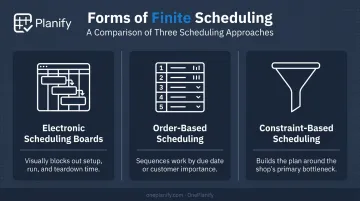
Finite scheduling shows up in a few practical forms:
- Electronic scheduling boards block out setup, run, and teardown time visually so planners can see the sequence
- Order-based scheduling sequences work by overall order priority, whether that's due date or customer importance
- Constraint-based scheduling builds the plan around the shop's primary bottleneck first
Where finite scheduling earns its keep: wherever multiple orders compete for the same welding cells, CNC machines, or assembly stations, and where routings vary job to job:
- High-mix, low-volume machine shops running dozens of part numbers weekly
- Metal fabricators sequencing cutting, forming, and welding across shared equipment
- Job shops with tight dependencies, where one operation can't start until the previous one finishes
The payoff is measurable. Indiana aerospace fabricator Harrison Mfg. saw almost 20% more production after tightening its order sequencing with finite scheduling, enough to cancel a shift it had planned to add.
Infinite Scheduling: Due-Date-First Planning
Infinite scheduling flips the logic. It starts from the customer's due date and works backward, assuming the resources needed will simply be there when called for. In operations research terms, this means calculating work-center loads by time period without regard to available capacity, then reconciling any conflicts afterward.
That simplicity is the appeal. This approach skips constraint modeling and shift calendar setup, with no changeover matrix to track.
Core benefits:
- Faster planning cycles with minimal setup
- Default alignment with customer-promised dates
- No need for detailed constraint data to get started
Where infinite scheduling still works well:
- Make-to-stock environments producing standard SKUs on predictable lines
- Low-complexity, repetitive manufacturing with minimal routing variation
- High-level sales and production planning, before floor-level detail matters
The failure mode shows up when capacity is actually tight. Infinite scheduling never checks resource availability until conflicts surface, so the same pattern repeats: due dates get promised, and orders pile onto the same machine. The shop finds out only once the order is already behind, triggering rushed, poorly targeted overtime.
Finite vs Infinite Scheduling: Which Is Better for Your Shop?
Neither method wins universally. The real question is how complex and constrained your floor actually is.
Weigh these factors:
- Shop complexity – how many work centers and routings does a typical job touch?
- Resource constraints – do machines, tooling, or skilled labor genuinely bind throughput?
- Disruption frequency – how often do rush orders or downtime force a re-sequence?
- Due date firmness – can a delivery date move, or is it locked?
How to Decide Between the Two
Choose infinite scheduling if you run simple, low-variability work where deadlines rarely collide with capacity. Make-to-stock shops with one or two work centers and rare disruptions don't need constraint modeling overhead.
Choose finite scheduling instead if you manage multiple work centers, dependencies, and frequent floor disruptions. The data backs this up. After correcting routings and configuring work centers to reflect real capacity, NIST reports that fabricator Stainless Works cut lead time from 12-14 weeks to 5 weeks. That shift added $250,000 in retained or increased sales and $50,000 in cost savings.
The Hybrid Argument, Reconsidered
Most scheduling discussions land on a hybrid answer: infinite visibility for sales, finite execution on the floor. That's reasonable, but it assumes you need two separate systems to get there.
A comprehensive finite scheduler that already accounts for setups, shift changes, and dependencies, like OnePlanify, removes that trade-off. Sales still gets due-date visibility, while the floor runs on a schedule that respects real capacity, without planners toggling between tools.
Ease of Use Is Often the Real Deciding Factor
For smaller shops, this decision comes down to practicality. Many avoid finite scheduling because legacy APS tools demand a dedicated scheduler and months of configuration. Spreadsheet-simple finite tools are changing that math, letting a shop with no scheduling role on staff run a constraint-aware schedule anyway.
Real-World Case Study: Finite Scheduling in Action
Harrison Mfg., an Indiana aerospace fabrication shop, ran on due-date-driven planning for years. Orders got promised based on when the customer needed them, not whether the welding cell or CNC mill actually had open time. The result: missed deliveries, chaotic double-booking, and overtime spent chasing dates that were unrealistic from the day they were promised.
The trigger for change was growth itself. Harrison was running two shifts and weighing whether to add a third just to keep up with backlog, a decision that exposed exactly how much its scheduling method was costing it.
After adopting finite scheduling and tightening order sequencing, the results were immediate:
- Almost 20% more production from the same equipment
- Enough throughput gain to run on a single shift
- The planned additional shift was canceled entirely
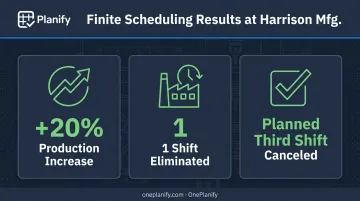
Harrison didn't need more machines or more people. It needed a schedule that reflected what its machines and people could actually do.
The takeaway ties directly to shop complexity: the more dependencies and shared resources your shop juggles, the more finite scheduling pays off, because that's exactly where infinite scheduling's core assumption breaks down fastest.
If your shop looks anything like Harrison's before the switch, see what comprehensive finite scheduling looks like without the ERP price tag. OnePlanify brings setup-aware, shift-aware, dependency-aware scheduling to shops without a dedicated scheduler, with onboarding measured in weeks, not quarters.
Conclusion
There's no universal winner between finite and infinite scheduling. The right answer depends on how complex and constrained your floor actually is, not on which method sounds more sophisticated.
If your shop runs simple, predictable work with loose capacity, infinite scheduling's due-date-first simplicity might serve you fine. If you're juggling multiple work centers, shared resources, and routing dependencies, finite scheduling is where the real gains sit. Expect fewer missed deadlines, better resource utilization, and less time firefighting a schedule nobody trusts.
Match the method to your floor's reality. The barrier to finite scheduling isn't what it used to be, either. Easy-to-use, spreadsheet-simple tools such as OnePlanify now make constraint-aware scheduling accessible to shops that once assumed it required an ERP overhaul.
Frequently Asked Questions
What is finite scheduling?
Finite scheduling assigns work only when a resource, like a machine or operator, is genuinely available. It respects real capacity limits instead of assuming unlimited resources, producing a schedule the floor can actually execute.
What is the difference between finite and infinite capacity scheduling?
Finite scheduling schedules from actual available capacity, respecting constraints like shift calendars and setups. Infinite scheduling backward-schedules from a due date, assuming capacity is unlimited until conflicts surface later.
What is the best scheduling method?
There's no single best method. It depends on your shop's complexity, how tightly resources are constrained, and how firm your customer due dates really are.
Can finite and infinite scheduling be combined?
Yes. Many manufacturers use infinite scheduling for high-level sales visibility while relying on finite scheduling to execute work on the floor. Comprehensive finite tools can support both at once.
What industries benefit most from finite scheduling?
Complex, resource-constrained environments benefit most: machine shops, metal fabricators, and high-mix, low-volume manufacturers with shared equipment and tight routing dependencies.
Does finite scheduling require special software?
Finite scheduling can technically be done manually, but it's slow and error-prone at scale. Modern tools like OnePlanify make it as simple as a spreadsheet, removing the traditional complexity barrier.