Introduction
On most shop floors, "planning" and "scheduling" get used like synonyms. A planner says it, a scheduler repeats it, and everyone nods along in the daily standup.
But treating them as the same thing is exactly how you end up with a production plan that looks great on paper and a shop floor that's three days behind by Wednesday.
The distinction isn't academic. It determines whether you hit on-time delivery targets and whether your machines run at real utilization instead of paper utilization. Get it wrong, and a breakdown becomes a missed customer deadline instead of a minor hiccup.
This article breaks down what planning means, what scheduling means, where they overlap, and how the two work together to keep production moving.
Key Takeaways
- Planning defines production's long-term what, how much, and when.
- Scheduling sets the daily who, where, and in what order.
- Demand and capacity data drive planning; scheduling turns direction into a timetable.
- A great plan executed on a bad schedule still misses deadlines.
- Treating scheduling as its own discipline boosts throughput and lowers WIP inventory.
Planning vs Scheduling: Quick Comparison
Planning and scheduling answer different questions on different timelines, using distinct inputs. Here's how they stack up side by side.
| Dimension | Planning | Scheduling |
|---|---|---|
| Time horizon | Weeks to months; revisited periodically | Daily or shift-level; adjusted constantly |
| Primary focus | Quantities, capacity, demand alignment | Task sequencing, machine assignment, exact timing |
| Flexibility | Relatively stable | Fluid, changes hourly when disruptions hit |
| Output | Production Plan / Master Production Schedule | Detailed shop-floor timetable or dispatch list |
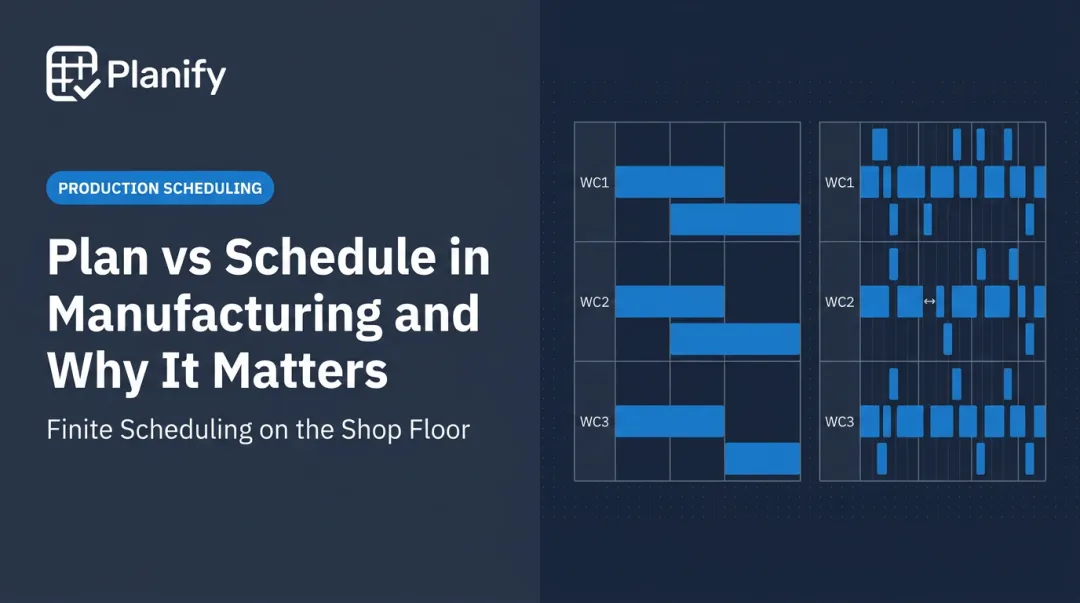
Planning answers "how much, and by when, roughly." Scheduling answers "exactly which machine, exactly what order, exactly what time." Neither replaces the other.
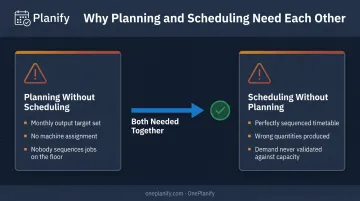
Planning without scheduling produces a monthly output target with no way to execute it. Nobody knows which machine runs which job first. Scheduling without planning produces a perfectly sequenced timetable for the wrong quantities, because nobody validated demand against capacity to begin with.
Use planning when you need to:
- Align production capacity with sales forecasts
- Set inventory targets for the coming quarter
- Determine whether current headcount and machine capacity can absorb demand
Use scheduling when you need to:
- Sequence today's jobs across specific machines
- React to a breakdown or a rush order
- Account for shift changes, operator skills, and setup times
- Handle preventive maintenance windows without disrupting downstream jobs
The practical takeaway: use planning to set direction and capacity. Then use scheduling, ideally software-assisted, to execute against real constraints like setups, shift changes, and job dependencies that a monthly plan was never built to handle.
What is Planning?
Production planning is the process of deciding what to produce, how much of it, and by when, well before any job hits the shop floor. It results in two connected documents: the Production Plan, which sets aggregate output and resource levels, and the Master Production Schedule (MPS), which breaks that plan down into specific end-item quantities and timing.
Planning exists to align three things that rarely agree on their own: sales forecasts, available capacity, and current inventory. Get that alignment right, and manufacturers reduce excess stock, avoid emergency overtime, and give sales a delivery date they can actually keep.
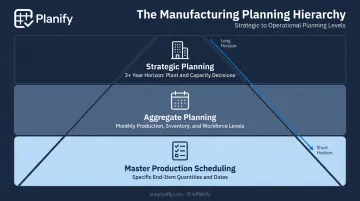
Planning isn't one activity. It operates at different altitudes:
- Strategic planning: long-range capacity decisions, generally three years or more (adding a plant, entering a new product line)
- Aggregate planning: sets overall production, inventory, and workforce levels for the coming months
- Master production scheduling: translates the aggregate plan into specific end-item quantities and dates, medium-term
Use Cases of Planning
Planning shows up most visibly in Sales & Operations Planning (S&OP) cycles, where demand forecasts, supply capacity, and financial targets get reconciled into one agreed production plan. It's also central to capacity planning cycles that determine whether current resources can absorb next quarter's demand.
Seasonal demand puts these planning cycles to the test. Make-to-stock manufacturers dealing with seasonal demand lean on planning heavily. Footwear is a classic example: the industry historically ran on two large seasonal delivery windows, concentrating production into big batches.
Nike pushed retailers toward four seasons and, by 2017, began introducing products on a monthly cadence to smooth out demand swings instead of large seasonal spikes.
The lesson for make-to-stock producers: don't treat seasonal cycle stock as a fixed number. Revise it periodically, and use the off-season to build inventory in smaller increments. Planning's job is to smooth the peaks before they ever hit the floor.
What is Scheduling?
If planning decides how much to make, scheduling decides exactly how it gets made: which job runs on which machine, in what order, starting and ending at what time. This is where a production plan meets shop-floor reality. Machine setups, shift changes, operator skills, and material availability all get resolved here, not in the monthly plan.
Good scheduling delivers measurable operational wins: less unplanned downtime, fewer wasted changeovers, better on-time performance, and lower work-in-process inventory sitting between operations.
Why Finite Scheduling Matters
Basic scheduling tools just assign a time slot. Finite scheduling goes further. It builds the schedule from actual available capacity, so a job is never assigned to a machine, shift, or operator that's already committed elsewhere.
That distinction sounds small. It isn't. A schedule that ignores real capacity constraints is a schedule the floor can't actually run. Spreadsheets typically break down right here. They can list jobs, but they can't model sequence-dependent setup times, shift calendars, or operation dependencies without turning into a mess of manual updates.
That's the gap tools like OnePlanify's Planify platform are built to close, treating setups, shift changes, dependencies, and disruptions as first-class scheduling constraints instead of problems a planner has to catch manually. In practice, that means:
- Setups and changeovers: modeling exact sequence-dependent setup times (Job A to Job B might need 45 minutes; Job A to Job C might need only 15) and grouping compatible jobs to cut re-tooling
- Shift-aware calendars: placing work only inside real 1st, 2nd, and 3rd shift windows, respecting weekend closures and holiday exceptions
- Routing dependencies: enforcing that Op 20 can't start before Op 10 finishes, even after a full replan
- Disruption replanning: rebuilding the entire schedule in seconds when a machine goes down or a rush order lands, with a preview mode to test impact before committing
Use Cases of Scheduling
Scheduling is mission-critical wherever job mix is high and volume per job is low. Discrete manufacturers running frequent changeovers, press shops, machine shops, and CNC operations feel the cost of poor scheduling directly. Changeover time is often called the hidden capacity killer: a schedule that looks 85% utilized on paper can run at closer to 60% once real setup time gets accounted for.
The results of disciplined scheduling are documented. Applied Composites, an aerospace and defense composites manufacturer, replaced spreadsheet-based scheduling with finite scheduling logic and cut scheduling work from hours down to minutes. The shop now reaches average on-time delivery of 96%-98%, a direct result of modeling materials, tooling, molds, operator skill, and machine constraints together instead of relying on tribal knowledge.
Real-World Example: Turning a Plan into a Working Schedule
Even a well-built production plan can stall on the floor if scheduling doesn't get the same attention. Guntert & Zimmerman, a manufacturer of concrete paving equipment, ran a classic high-mix, low-volume job shop: dozens of unique orders, each with its own routing, competing for the same machines.
The company had demand under control. What it didn't have was a reliable way to sequence work once orders hit the floor. Jobs queued up, work-in-process piled between operations, and lead times stretched out even when the production plan itself was sound.
The trigger for change was growing order complexity. More variation between jobs meant static, first-come-first-served sequencing couldn't keep up. Guntert & Zimmerman adopted Theory of Constraints-based disciplined scheduling, focused on managing the bottleneck resource and controlling WIP rather than trying to optimize every machine equally.
The results were dramatic:
- Production time fell from 8-12 weeks down to 3-4 weeks
- No additional capacity added
- No additional headcount required
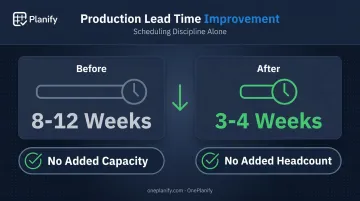
The plan didn't change. How work got sequenced and released to the floor did.
That's the core lesson for any manufacturer stuck between a solid plan and inconsistent execution.
The plan sets the destination. Disciplined scheduling determines whether you arrive on time.
OnePlanify was built for exactly this gap. Instead of manually resequencing a spreadsheet every time a machine goes down or a rush order lands, OnePlanify replans the full board in seconds, preserving setups, shift constraints, and dependencies throughout.
If you're managing setups, shift changes, and disruptions on a floor where the plan looks fine but execution doesn't, see how OnePlanify simplifies finite scheduling for operations like yours.
Conclusion
Planning and scheduling work together as sequential, complementary functions in the production process. Planning sets the destination: what to produce, how much, and by when, based on demand and capacity. Scheduling charts the day-to-day route: which job runs on which machine, in what order, and how disruptions get absorbed without blowing the delivery date.
Manufacturers who invest in both disciplines, backed by dedicated scheduling software, tend to see the same tangible outcomes: less downtime, better resource utilization, and delivery performance customers can rely on. Planning gets you a good production plan. Scheduling, done well with tools like OnePlanify, is what turns that plan into work that actually happens on the floor, on time.
Frequently Asked Questions
What is planning and scheduling?
Planning is the strategic process of deciding what to produce, how much, and by when. Scheduling is the detailed execution plan that determines who does what, on which machine, and in what order.
What are the 4 types of planning?
The four types are strategic (3+ year outlook), tactical (annual), operational (daily and weekly), and contingency (backup plans for disruptions). For example, strategic planning decides whether to add a plant, while contingency planning covers a machine failure mid-run.
What is an example of planning and scheduling?
Planning decides that a plant needs 10,000 units this month based on demand forecasts. Scheduling then assigns specific jobs to specific machines and shifts, in a specific order, to hit that target.
What is the difference between a scheduler and a planner?
A planner focuses on demand, capacity, and resource forecasting over weeks or months. A scheduler focuses on sequencing and assigning day-to-day tasks, deciding which job runs next and on which machine.
Can the same person or team handle both planning and scheduling?
Smaller manufacturers often combine both roles into one job, which works fine at low complexity. Larger or high-mix operations usually need a dedicated scheduler, since sequencing and disruption response demand constant attention.
What tools help manufacturers manage both planning and scheduling?
ERP systems typically handle planning: demand, capacity, and inventory data. Dedicated finite scheduling software, like OnePlanify, handles the shop-floor complexity of setups, shift changes, dependencies, and disruptions that ERPs weren't built for.