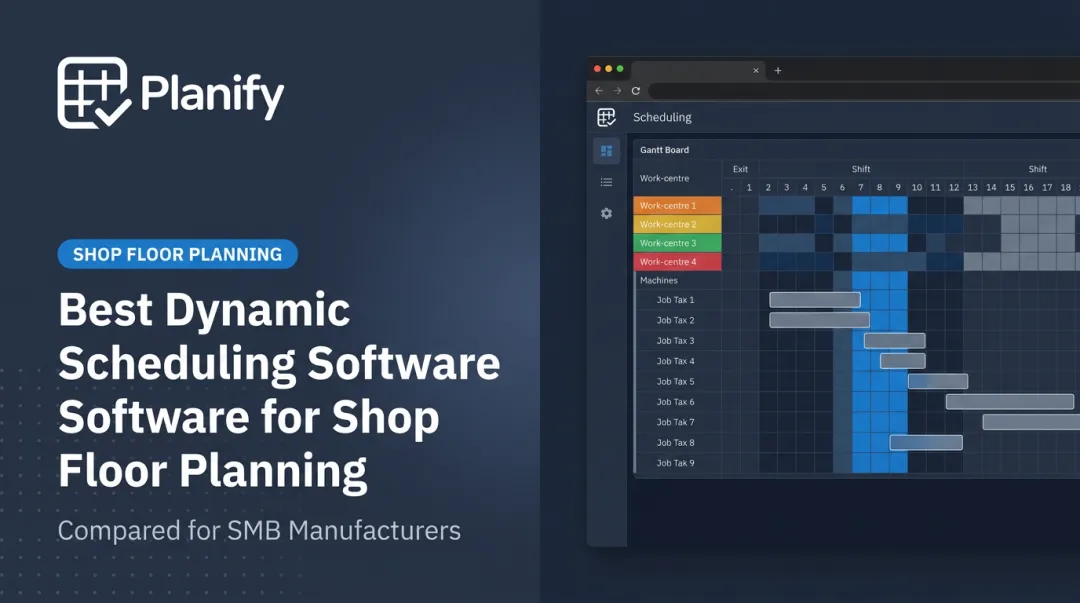
Automated scheduling software changes the equation. It sequences jobs against real machine capacity, shift patterns, and setup times, then adjusts automatically when something goes wrong. The result: better on-time delivery, higher machine utilization, and fewer costly surprises on the floor.
Interest in this category has grown sharply. Gartner has noted rising demand for detailed manufacturing scheduling tools as manufacturers push toward operational excellence and continue investing in planning technology. This article breaks down the top five tools worth evaluating in 2026.
TL;DR
- Automated scheduling software manages finite capacity, setups, and shift constraints beyond typical calendar or ERP tools
- The best tools balance real-world shop floor complexity with a learning curve planners can actually manage
- We reviewed five leading tools based on finite scheduling depth, ease of use, and integration strength
- OnePlanify stands out for pairing spreadsheet-simple usability with comprehensive finite scheduling logic
Overview of Automated Scheduling Software in Manufacturing
Automated (or finite) scheduling software sequences jobs, machines, and labor based on real capacity limits, not the assumption of unlimited resources.
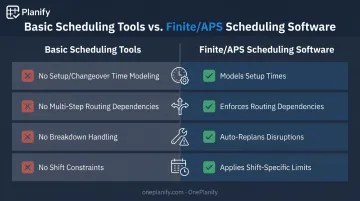
That distinction matters. Meeting schedulers and employee shift-planning apps solve a different problem entirely. They don't account for:
- Setup and changeover time between jobs
- Multi-step routing dependencies (Op 10 → Op 20 → Op 30)
- Machine breakdowns or rush-order disruptions
- Shift-specific labor and capacity constraints
Finite scheduling tools, sometimes called Advanced Planning and Scheduling (APS) software, are purpose-built for this. Recent industry analysis points to real-time data and AI as the forces reshaping how manufacturers optimize resources and respond to disruptions on the floor.
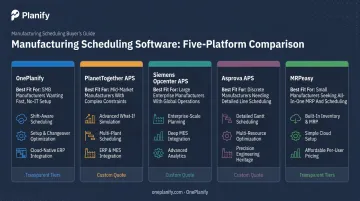
Below are the five tools worth putting on your shortlist this year. Each one is evaluated on finite scheduling depth, ease of adoption, and how well it handles the chaos of a real production floor.
Top Automated Scheduling Software Tools for Manufacturing in 2026
Each tool below was assessed on finite scheduling accuracy, ease of use for planners without dedicated scheduling teams, disruption/changeover handling, and real-world adoption on shop floors.
OnePlanify
OnePlanify's Planify platform was built for the messy reality of manufacturing: setup times, shift changes, cross-department job dependencies, and the inevitable rush order that blows up the day's plan.
What sets it apart is the gap it closes. Traditional APS tools deliver finite scheduling power but demand months of training and configuration. Basic tools are easy to use but can't model real constraints. Planify delivers both: comprehensive finite scheduling logic inside a spreadsheet-familiar workspace planners can run on day one.
A few specifics worth knowing:
- Multi-operation routing is enforced with predecessor locks, so no downstream operation starts before its upstream step finishes, even during a full disruption replan
- Run on Pretend lets planners model a machine breakdown or rush order, test three response options in about three minutes, and commit the best one with a single click
- Shift-aware calendars apply per work center, covering 1st/2nd/3rd shifts, overtime rules, holidays, and weekend closures
- ERP integration connects to Epicor, SYSPRO, IQMS/DELMIAWorks, Global Shop, Infor, JobBOSS, Odoo, NetSuite, and SAP Business One via CSV, API, or database read patterns
- Onboarding is delivered in small cohorts, with a live finite schedule running in weeks rather than the 6–12 months typical of enterprise APS rollouts
| Category | Details |
|---|---|
| Ease of Use | Spreadsheet-like interface; minimal training required for planners |
| Core Capability | Comprehensive finite scheduling covering setups, shift changes, job dependencies, and disruption handling |
| Best Fit For | Small to mid-sized manufacturers needing robust scheduling without enterprise complexity |
The tradeoff: as a newer platform, OnePlanify has fewer published case studies and third-party benchmarks than established players like PlanetTogether or Siemens.
Pricing runs per-planner or per-work-center, and OnePlanify scopes exact figures during a discovery call rather than publishing flat rate cards.
PlanetTogether APS
PlanetTogether has been around since 2004, with roots in scheduling research out of Cornell University. It's an established APS platform used across discrete and process manufacturing, and CAI Software announced its acquisition of the company in mid-2026.
The platform's strength is scenario simulation. Planners can test rush orders, supplier delays, or labor changes before committing anything to the live schedule, then make manual adjustments through a drag-and-drop Gantt interface that checks capacity and material rules in real time.
One vendor case with Snak King reported a 25% increase in production output and a 30% reduction in changeover time after implementation, a solid signal of what's possible, though it's a vendor-reported result rather than an independent benchmark.
| Category | Details |
|---|---|
| Key Features | Simulation-based what-if scheduling; ERP/MRP integrations with SAP, Microsoft Dynamics, NetSuite, and Oracle |
| Pricing | Not publicly listed; requires a custom quote |
| Best Fit For | Mid-to-large manufacturers with dedicated planning staff |
The tradeoff: PlanetTogether requires more setup and training investment than lighter tools, which can be a barrier for smaller operations without a planning department.
Siemens Opcenter APS (formerly Preactor)
Opcenter APS is Siemens' enterprise-grade scheduling suite, built on the legacy of Preactor and now woven into the broader Opcenter MES/PLM ecosystem. It's used globally across process and discrete manufacturing.
Its biggest advantage is depth of integration. Opcenter supports both finite and infinite planning modes, factoring in resource availability, materials, and business rules, then feeds that data across ERP, MES, QMS, and manufacturing intelligence systems. Deployment options include on-premises, hybrid, or SaaS through Opcenter X, flexible enough for single-site plants or globally distributed operations.
A Siemens Drives case study reported delivery capability improving by 4%, machine utilization up 14%, and work-in-progress inventory down 60% after adopting the Opcenter APS suite.
| Category | Details |
|---|---|
| Key Features | Constraint-based scheduling; integration with Siemens Opcenter MES |
| Technical Specs | On-prem, hybrid, and SaaS deployment; supports aerospace, automotive, chemicals, food/beverage, life sciences, and electronics |
| Best Fit For | Large enterprises already invested in the Siemens digital manufacturing stack |
This is a strong fit only if you're already inside, or planning to move into, the Siemens ecosystem. Standalone adoption tends to be a heavier lift.
Asprova APS
Asprova claims over 3,300 installed sites across 44 countries, with particularly deep adoption in automotive and electronics supply chains. Official case studies include automotive suppliers like F-Tech and Shonan Unitec, plus electronics manufacturers such as Panasonic Appliances Air-Conditioning Malaysia.
The platform's core strength is handling detailed, multi-stage production. Its parametric manufacturing BOM module supports multiple pegging methods, inventory expiration tracking, and timing constraints between processes. Setup time modeling is granular too: it can vary based on the combination of preceding and following output items, not just a flat changeover assumption.
One documented auto-parts case reported planning time cut by roughly one-third and finished-product inventory reduced to under two-thirds of its former level.
| Category | Details |
|---|---|
| Key Features | Parametric BOM scheduling; detailed changeover/setup optimization |
| Pricing | "Open price" licensing — package cost, training, and implementation are scoped individually |
| Best Fit For | Manufacturers with intricate multi-stage production processes |
Because pricing isn't published, budgeting for Asprova means factoring in implementation consulting and system integration from the start.
MRPeasy
MRPeasy takes a different approach entirely: it's a cloud-based MRP/ERP platform with finite scheduling built in, aimed squarely at small manufacturers with 10 to 200 employees.
Rather than a standalone scheduling engine, MRPeasy bundles drag-and-drop production scheduling with inventory management, order tracking, and procurement in one system. When capacity runs short, it automatically pushes the job to the next available slot instead of overloading a resource.
Pricing is fully transparent, which is rare in this category:
| Tier | Price |
|---|---|
| Starter | $49/user/month |
| Professional | $69/user/month |
| Enterprise | $99/user/month |
| Unlimited | $149/user/month (2-user minimum) |
| Category | Details |
|---|---|
| Key Features | Drag-and-drop production scheduling bundled with MRP/inventory tools |
| Pricing | $49–$149 per user/month across four tiers |
| Best Fit For | Small manufacturers wanting an all-in-one, budget-friendly system |
The catch: because scheduling is one module inside a larger ERP, it doesn't go nearly as deep on complex routing or disruption modeling as dedicated APS tools.
How We Chose the Best Automated Scheduling Software
The most common mistake manufacturers make is picking a tool built for meeting bookings or employee shifts, then wondering why it can't handle a machine breakdown mid-shift. True finite scheduling software is a different category entirely.
We weighed each tool against five factors, each tied directly to floor-level outcomes:
- Finite scheduling accuracy: Does it model real capacity, or assume infinite resources? This determines whether on-time delivery actually improves.
- Ease of adoption: Can a planner without formal APS (Advanced Planning and Scheduling) training run it confidently within days?
- Disruption and changeover handling — How fast can the tool resequence the board after a breakdown or rush order, while preserving setup and dependency rules?
- ERP/MRP integration: Does it sit alongside existing systems, or force a rip-and-replace?
- Customer feedback: What do actual shop floor users report about downtime, training time, and trust in the published schedule?
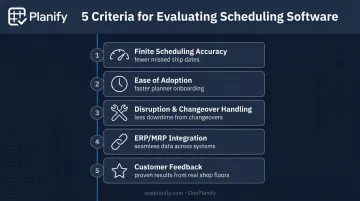
Every factor maps to a business result manufacturers actually care about: fewer missed ship dates, less idle machine time, and lower total cost of ownership once training and implementation are factored in.
Conclusion
The best scheduling tool is the one that matches your shop floor's actual operating reality. A 500-person plant running Siemens MES already has different needs than a 30-person job shop running mill-weld-finish routings on three machines.
Before committing, weigh three factors:
- Scalability as order volume and complexity grow
- Ease of use for the planners who'll run it daily, not just IT
- Total cost of ownership, including training and implementation time — not just the license fee
If you're running a small-to-mid-sized shop and want finite scheduling power without the six-figure implementation bill, see how OnePlanify handles setups, shift changes, and disruption replanning as easily as a spreadsheet. Request a scoping meeting to see it run on your own work orders.
Frequently Asked Questions
Is there an automated schedule maker?
Yes. Automated schedule makers exist for both meeting/appointment booking and manufacturing production planning. The two solve completely different problems: one manages calendars, the other manages finite machine and labor capacity.
Can AI do my scheduling?
AI-powered tools can now optimize production sequences, predict disruptions, and auto-adjust schedules. IDC projects 40%+ of manufacturers will add AI to existing scheduling systems by 2026. Human oversight still matters for complex judgment calls.
What is finite scheduling software?
Finite scheduling software accounts for real, limited capacity (machines, labor, shift hours) rather than assuming unlimited resources like basic planning tools do.
How does automated scheduling improve manufacturing efficiency?
It reduces idle machine time, minimizes manual replanning after disruptions, and improves on-time delivery by automatically resequencing jobs while preserving setup and dependency rules.
How much does automated scheduling software cost for manufacturers?
Pricing spans a wide range: SMB tools like MRPeasy run $49–$149 per user/month, while enterprise APS licenses require custom quotes. Total cost should always include implementation and training time, not just the license fee.
What's the difference between ERP scheduling and dedicated finite scheduling software?
ERP scheduling modules are typically basic and assume infinite capacity. Dedicated finite scheduling tools like OnePlanify handle real shop floor constraints, setups, and disruptions in detail, and integrate alongside your ERP rather than replacing it.