Many manufacturers still coordinate this with spreadsheets and phone calls. That approach breaks down quickly: visibility gaps appear, resources get double-booked, and inter-site handoffs get missed entirely.
This guide covers what multi-site planning actually means, the biggest challenges manufacturers face, the planning strategies available, the software features that matter, and the best practices that keep a multi-site schedule from falling apart.
Key Takeaways
- Multi-site planning coordinates capacity, materials, and schedules across facilities to protect on-time delivery
- Effective scheduling needs finite capacity visibility, not infinite-capacity MRP assumptions
- Most manufacturers land on a hybrid: central oversight paired with site-level finite scheduling
- The right software handles setups, shift differences, and disruption without a scheduler at every site
What Is Multi-Site Production Planning and Scheduling?
Multi-site production planning and scheduling coordinates production schedules, capacity, and resources across two or more manufacturing facilities that share demand, materials, or customer orders. It's the difference between running one shop floor and running a network of them that all need to hit the same delivery dates.
Planning operates on a medium- to long-term horizon: allocating capacity and materials across sites before work ever starts. Scheduling operates short-term, sequencing specific jobs on a specific site's machines and shift calendars, day to day.
Multi-site environments add layers single-site operations never deal with:
- Inter-site transfers of parts or subassemblies
- Shared SKUs made at more than one plant
- Different routings and work centers at each location
- One consolidated view across all facilities, not several disconnected ones
How Multi-Site Scheduling Differs from Single-Site Scheduling
Single-site scheduling balances jobs against one set of resources. Multi-site scheduling adds a decision layer before that: which site should run the job, then how it gets scheduled finitely once assigned there.
A common pattern: a main plant runs at capacity, so overflow work gets pushed to a branch factory. As new orders arrive, the overload shifts, and planners have to re-adjust which site absorbs which jobs. That constant rebalancing is unique to networked operations, and it's exactly where spreadsheets fall apart.
What Is PPC (Production Planning and Control) in ERP?
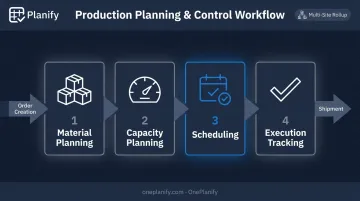
Managing that rebalancing manually is exactly the gap PPC is meant to close. PPC is the ERP function that plans, sequences, monitors, and controls production activities. It covers material planning, capacity planning, scheduling, and shop-floor execution tracking, from order creation through shipment.
In a multi-site ERP setup, PPC has to account for site-specific master data, meaning routings, bills of materials, and shift calendars. At the same time, it still needs to roll everything up into one unified planning view. That's where most generic ERP scheduling modules struggle, since they typically assume infinite capacity rather than the real constraints on each floor.
Key Challenges of Multi-Site Production Scheduling
Coordinating multiple plants introduces problems that simply don't exist in a single-facility operation.
Visibility gaps. Without a unified view across plants, planners can't see real-time capacity or job status at sister sites. That leads to duplicate orders, missed transfer windows, and decisions made on outdated information.
Resource and capacity imbalance. One site sits idle while another drowns in overdue work. Planners end up firefighting, manually rebalancing loads instead of running a proactive plan.
Master data inconsistency. Different sites often use different routings, work centers, shift calendars, and even item codes for the same part. Building one consolidated schedule on top of inconsistent data is close to impossible.
Disruption ripple effects. A machine breakdown, an absent shift, or a late material delivery at one site cascades into downstream production and dependent orders at sister sites.
A study of automotive supplier networks modeled exactly this kind of cascade, mapping disruption spreading across 121 nodes and 193 links in a Toyota-Honda supply network. The disruption moved both downstream to customers and upstream to suppliers.
The stakes of getting network coordination right can be substantial. BMW's own production network modeling covered 36 products across six production sites over a 12-year horizon. One strategic allocation strategy from that model cut discounted network costs by €9.3 billion, or 7%, against the company's baseline plan.
That's a large-enterprise strategic case, not an SMB benchmark. Still, it shows how much rides on cross-site allocation before daily scheduling even enters the picture.
Types of Production Planning Strategies for Multi-Site Operations
Manufacturers running multiple sites rarely stick to one production type. Several often run simultaneously across different plants:
- Job or project-based: unique, custom orders with high routing variability, common at smaller specialty sites
- Batch: similar items moving through production in groups, where changeovers and equipment compatibility drive the schedule
- Flow or continuous: long runs of high-volume, low-variety output, typically at dedicated high-throughput plants
- Mass production: many identical items produced to keep unit costs down
Beyond production type, manufacturers choose how planning authority is distributed:
- Centralized planning: one master schedule allocates orders across sites from a central system
- Decentralized planning: each site plans independently, syncing periodically with headquarters
- Hybrid: central demand and capacity planning paired with site-level finite scheduling for shop-floor accuracy
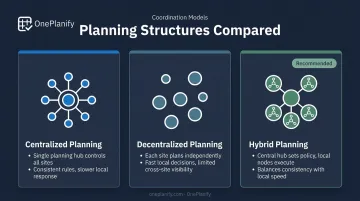
An exploratory study in the International Journal of Production Research, examining 107 manufacturing plants, found the right structure depends on context. Centralized setups appeared more often at higher-volume plants, while decentralized setups fit lower-flow environments like job shops. The study's "integrated" structures — essentially the hybrid model described above — suited plants with higher flow orientation but lower volume.
There's no universal winner. Most manufacturers land on the hybrid model since it gives headquarters demand visibility without stripping each site of the shop-floor detail only a local plan can capture.
Essential Features to Look for in Multi-Site Scheduling Software
Not every scheduling tool is built for a network of plants. Here's what actually matters when evaluating options.
- Centralized comparison view: planners need to compare schedules, loads, and bottlenecks across every site at once, not by logging into five separate systems
- Finite capacity scheduling: the engine must reflect real constraints, such as setups, changeovers, shift patterns, and labor availability, not the infinite-capacity assumptions baked into most ERP modules
- Scenario or "what-if" simulation: before committing a rebalancing move, planners should be able to test it and see the downstream impact first
- Automated dependency and disruption handling: when a delay or breakdown hits any site, downstream jobs need to re-sequence automatically
- Reporting and KPI tools: on-time delivery, utilization, and throughput matter both per site and in aggregate
How Planify Delivers These Capabilities
This is the gap Planify is built to close. Its scheduling engine assigns shift calendars per work center, so 1st, 2nd, and 3rd shift patterns, weekend closures, and holiday exceptions can each differ without breaking the schedule.
That architecture is what makes differentiated calendars across departments, or across sites, workable at all. It also holds up when disruption hits.
Planify's Run on Pretend mode lets a planner model the fallout, whether it's a machine breakdown, absent operator, or late material, before touching the live schedule.
It shows exactly which orders will slip and by how much, then tests multiple response scenarios in minutes. Once a plan is chosen, Run on Active pushes it live, holding setup times, shift constraints, and multi-operation dependencies steady through the replan.
That level of control doesn't require a dedicated scheduler at every plant. Because the platform is browser-based with role-based access for planners, foremen, and viewers, one planner can run it from a central seat.
It layers on top of existing ERPs like Epicor, SYSPRO, or NetSuite through CSV, API, or database connections, so there's no rip-and-replace involved.
Best Practices for Successful Multi-Site Production Scheduling
Getting multi-site scheduling right depends far more on the operating discipline built around your software than on the software's feature list. These three practices make the difference:
- Standardize master data wherever possible, so routings, calendars, and item codes mean the same thing at every site and enable direct comparisons. McKinsey's research on supply chain operations recommends standardizing master data across locations, so every site works from the same fact base instead of reconciling conflicting numbers after the fact.
- Set clear escalation and rebalancing rules by defining what "near overload" looks like at each site and deciding in advance which sites absorb overflow. Reactive firefighting costs more than proactive shifting.
- Build buffer time into inter-site dependencies, since transit and handoff delays compound fast across a network. A day's slip at the sending site can turn into a week's slip at the receiving one without a cushion built in.
Frequently Asked Questions
What is PPC (production planning and control) in ERP?
PPC is the set of functions that plans, sequences, monitors, and controls production activities, typically within an ERP or a dedicated scheduling system. It covers material planning, capacity planning, scheduling, and execution tracking, from order creation through shipment.
What are the different types of production planning?
The main types are job or project-based, batch, flow or continuous, and mass production. Multi-site manufacturers often run several types simultaneously depending on what each site produces.
What's the difference between production planning and production scheduling?
Planning covers medium- to long-term capacity and material allocation decisions across a network. Scheduling is the short-term, sequence-level assignment of specific jobs to specific resources on a shop floor.
How does multi-site scheduling handle shift and calendar differences between plants?
Scheduling systems map each site's unique shift patterns, overtime rules, and calendar exceptions individually. That detail then rolls up into one consolidated view planners can use.
Can multi-site production scheduling work without a full ERP overhaul?
Yes. Dedicated finite scheduling tools can layer on top of an existing ERP, pulling work orders and routings while pushing sequenced schedules back, without replacing the underlying system.
How do manufacturers decide which site should produce a given order?
Factors include available capacity, routing and tooling fit, proximity to demand, and cost. Many manufacturers test the choice with what-if scenarios before committing an order to a specific site.